Botpress Alternative — Canary: SaaS, Live in 10 Minutes
Botpress alternative for SMBs that don't want to self-host. Canary: SaaS, live in 10 minutes vs Botpress's open-source setup. Pricing, AI, multi-tenant compared.
Quick answer: Botpress is a powerful, developer-first chatbot builder with 200+ integrations and an open-source core. Canary is a done-for-you hosted platform optimized for SaaS businesses and agencies that need to deploy AI chatbots across multiple client sites — without writing code or managing infrastructure.
These two platforms share some surface-level similarities — LLM-powered responses, knowledge base retrieval, embeddable web widgets — but their philosophies are fundamentally different. That difference determines which one is right for your team.
Quick Verdict
| Category | Canary | Botpress |
|---|---|---|
| Overall | ★★★★★ 9.2/10 | ★★★★☆ 8.1/10 |
| Ease of Setup | 10/10 — 5-min wizard | 6/10 — requires dev work |
| Pricing Predictability | 10/10 — flat monthly | 5/10 — platform + AI Spend |
| Multi-Tenant Support | 10/10 — built-in | 4/10 — requires custom engineering |
| Feature Depth | 8/10 — growing fast | 9/10 — mature ecosystem |
| Integrations | 7/10 — focused set | 10/10 — 200+ hub integrations |
| Developer Flexibility | 7/10 — API-first | 10/10 — open source + JS sandbox |
| Support Quality | 9/10 — dedicated | 7/10 — community-first |
Canary wins for: SaaS products, agencies, and businesses that need multi-tenant deployment without ongoing developer costs.
Botpress wins for: Developer teams that need maximum customization, complex multi-channel workflows, and don't mind managing LLM billing separately.
About Botpress
Botpress is one of the most recognized names in the chatbot space. Co-founded in 2017 by Sylvain Perron and Olivier Lalonde, it started as a fully open-source framework before evolving into a cloud platform. Today it has 300,000+ builders in its ecosystem, 750,000+ AI agents published, and 1 billion+ conversations processed.
Botpress's core product is a visual flow builder — Agent Studio — that lets developers drag and drop conversation nodes and wire them together with JavaScript logic. On top of that sits its "Autonomous Engine" (the LLMz inference layer): rather than following rigid scripts, it uses LLMs to dynamically decide which flow nodes to execute. This is a meaningful architectural choice — scripted logic provides precision and predictability, while LLMz-driven flows handle open-ended conversations that rule trees can't anticipate.
The platform supports deploying bots across web chat, WhatsApp, Instagram, Facebook Messenger, Slack, Microsoft Teams, and Telegram, with 200+ tool integrations via its Hub marketplace.
In June 2025, Botpress raised a $25M Series B led by Framework Venture Partners, with participation from Deloitte Ventures, HubSpot Ventures, Inovia Capital, and Decibel Partners. Notable enterprise customers include Kia, Electronic Arts, Husqvarna, Windstream, and Shell.
It holds a 4.5/5 rating on both G2 (419+ reviews) and Capterra (230+ reviews).
The trade-off is complexity. Botpress positions itself as "low-code, not no-code." To unlock its full power, you need JavaScript proficiency, API knowledge, and flow design experience. For teams without dedicated developers, that complexity becomes a ceiling rather than a floor.
Feature Deep-Dive
1. Onboarding and Setup
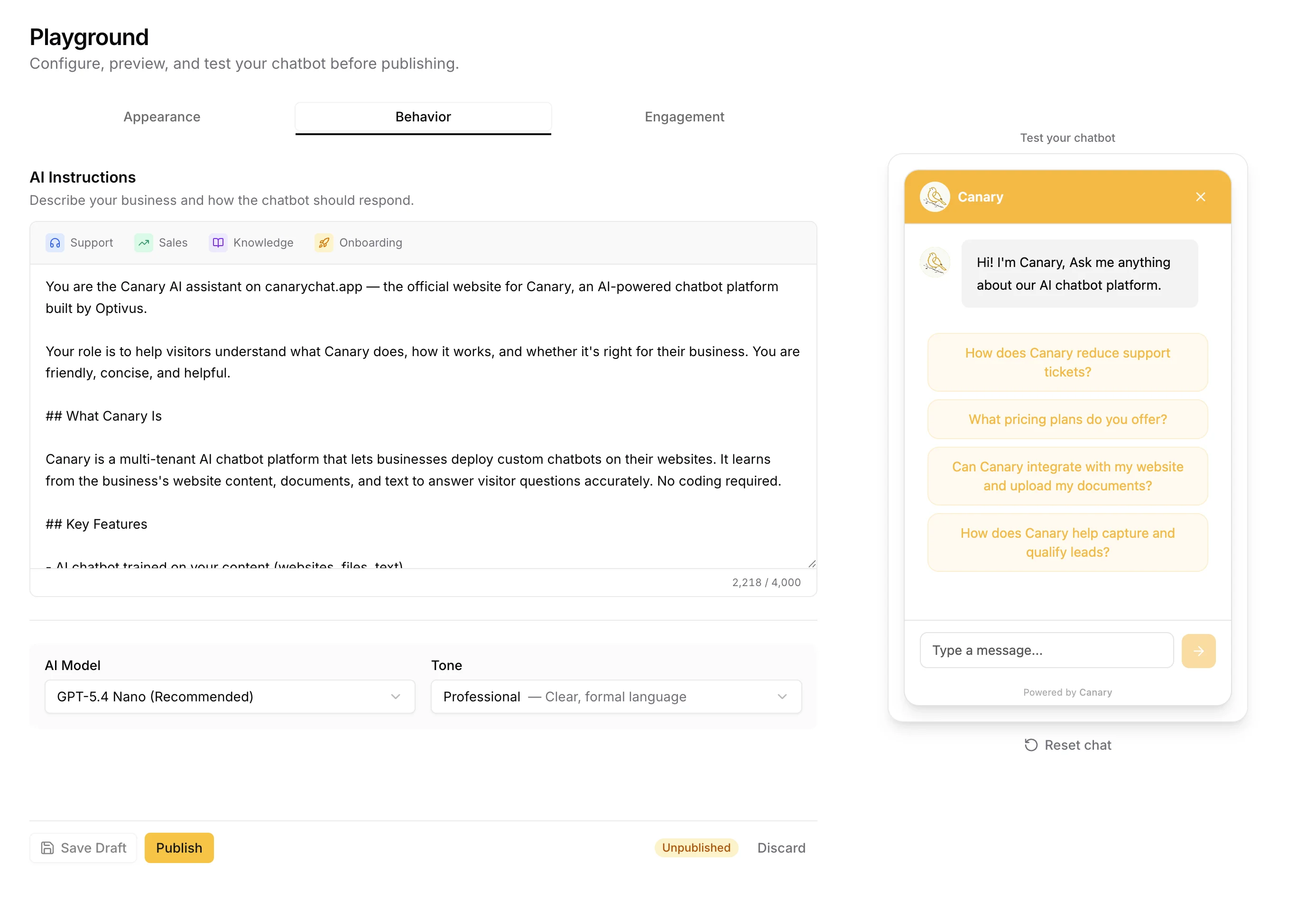
Canary was designed for the "I need this working by Friday" use case. The self-serve wizard walks through five steps — scan your website, customize the widget, upload training content, test the bot, copy the embed snippet — in under five minutes. No environment variables, no flow editor to learn, no LLM provider account to wire up.
Botpress offers a capable but considerably more complex starting experience. After account creation, you land in Agent Studio. Connecting a knowledge base, configuring a channel, wiring up an LLM, and deploying something production-ready typically takes several hours to several days. Forum posts from Botpress's 30,000+ member Discord consistently show beginners struggling to get past the first working demo.
Winner: Canary — the five-minute wizard is a genuine productivity advantage for non-technical founders and agency teams.
2. Knowledge Base and AI Training
Canary uses OpenAI's native Vector Store infrastructure for knowledge retrieval. Upload files (PDF, DOCX, CSV, XLSX), paste URLs, or import full sitemaps — the platform auto-detects sitemap URLs and crawls them via Firecrawl. A configurable confidence threshold (default 0.4) controls when the AI says "I don't know." Each tenant gets an isolated vector store, so customer A's documents never bleed into customer B's responses.
Botpress supports knowledge bases from websites, documents, tables, web search, and Notion. Its RAG approach is solid, with tiered Vector DB storage: 100MB free, 1GB on Plus, 2GB on Team — additional gigabytes cost $20/month each. Storage is shared across all bots in your account, not isolated per client.
Winner: Canary for multi-tenant isolation. Botpress wins on knowledge source variety (Notion, web search, tables).
3. Multi-Tenant Architecture
Canary was built specifically as a multi-tenant platform. Every tenant gets their own isolated configuration: separate system prompt, knowledge base (vector store), conversation history, lead capture settings, CSAT tracking, branding, and analytics. For a SaaS product or an agency running ten client sites, all of that isolation is provisioned automatically — no custom engineering required to prevent data leakage between clients. This is the reason Canary exists as a Botpress alternative for agencies and SaaS teams managing chatbots for multiple clients.
Botpress has no native multi-tenant concept. The platform models everything around separate "bots." The free plan gives you 1 bot, Plus gives 2, Team gives 3 — additional bots are $10/month each. There is no built-in mechanism for per-tenant knowledge isolation, per-tenant analytics, or per-tenant branding without writing custom code. Agencies building on Botpress typically maintain separate accounts per client, which multiplies subscription costs and management overhead.
Winner: Canary — by a wide margin for any multi-tenant use case.
4. Widget and Deployment
Canary's embed widget weighs just 4KB (built in Preact), loading asynchronously without blocking page rendering — important for Core Web Vitals scores. Features include: customizable brand colors and avatar, dark/light mode, pre-chat lead capture form, conversation starters, AI-generated follow-up questions, CSAT rating, proactive trigger bubbles, source citations, and multilingual support.
Botpress offers a web chat widget with similar surface features — customizable appearance, proactive messages, conversation history — but white-labeling (removing the "Powered by Botpress" badge) requires the Plus plan ($89/month minimum). Widget bundle size is not publicly documented.
Winner: Canary on bundle size, built-in feature set, and white-labeling without a paid upgrade.
5. Live Chat Handoff (HITL)
Canary includes human handoff at every plan tier. When the AI needs a human agent, it captures context, sends a formatted email notification via Resend, and marks the conversation in the admin dashboard. A daily digest summarizes handoffs, new leads, and ratings.
Botpress supports HITL (Human-in-the-Loop), but it is paywalled behind the Plus plan ($89/month). The free tier has no live agent handoff. Integration with external helpdesks like Zendesk requires custom JavaScript development.
Winner: Tie — both platforms support handoff. Canary includes it at every tier; Botpress has deeper live-agent UI tooling on paid plans.
6. Analytics and Reporting
Canary provides conversation volume, lead capture rate, CSAT distribution, funnel analytics with period-over-period comparison, GPT-powered topic classification, and daily digest emails — all per-tenant. An agency admin can view each client's metrics independently. CSV export is available for both conversations and leads.
Botpress offers conversation metrics, user retention analytics, NLP performance tracking, and flow bottleneck identification — but custom dashboards are locked to the $495/month Team plan. Per-bot analytics isolation is not available in standard plans.
Winner: Canary for accessibility (all analytics on every plan) and per-tenant reporting.
7. Security and Compliance
Botpress Enterprise provides SOC 2 Type II compliance, GDPR-compliant data residency options, SSO, SCIM provisioning, and audit logs. Standard plans (PAYG, Plus, Team) run on shared cloud infrastructure without custom data retention or residency guarantees. Enterprise security features require a $2,000+/month contract.
Canary is built on Supabase, which holds SOC 2 Type II certification. Tenant data isolation is enforced at the database layer — conversations, leads, and knowledge bases are strictly separated per tenant. Custom data residency options are not currently available, making Canary best suited for teams under standard GDPR/CCPA requirements rather than strict on-premises or regional hosting mandates.
Winner: Botpress for enterprise compliance requirements. Canary for standard GDPR/CCPA with zero configuration.
8. Developer Experience and Support
Botpress has a genuinely strong developer experience: a visual flow debugger, in-browser bot emulator, JavaScript sandbox with full Node.js access, REST API, TypeScript SDK, and a comprehensive documentation hub. Botpress Academy offers structured learning paths. Community support runs through a 30,000+ member Discord and active forums; priority support is available on paid plans.
Canary exposes a clean, fully-documented REST API for programmatic management of tenants, knowledge base content, conversations, and configuration. No flow debugger is needed — the AI handles conversation logic. Support is dedicated rather than community-first, with direct channels for all paid customers.
Winner: Botpress for deep developer tooling and community ecosystem. Canary for teams that don't want a developer dependency.
Pricing Breakdown
Botpress Pricing (March 2026)
Botpress uses a two-part billing model: a platform subscription fee plus separate "AI Spend" billed at provider rates. AI Spend is not included in any plan.
| Plan | Price (monthly) | Price (annual) | Messages/month | Bots | Seats |
|---|---|---|---|---|---|
| Pay-as-you-go | $0 + AI Spend | $0 + AI Spend | 500 | 1 | 1 |
| Plus | $89 + AI Spend | $79 + AI Spend | 5,000 | 2 | 2 |
| Team | $495 + AI Spend | $445 + AI Spend | 50,000 | 3 | 3 |
| Managed | $1,495 + AI Spend | $1,245 + AI Spend | Custom | Custom | Custom |
| Enterprise | Custom | Custom | Custom | Custom | Custom |
Key add-on costs:
- Extra 5,000 messages: +$20/month
- Extra bot (beyond plan limit): +$10/month
- Extra collaborator seat: +$25/month
- Extra 1GB vector DB storage: +$20/month
- Always Alive (prevents cold starts): +$10/bot/month
- White-label widget: Plus plan required
The AI Spend problem. Every intelligent action — knowledge base queries, AI task nodes, AI transitions, language detection, response generation — consumes LLM tokens billed at provider rates. Botpress does offer an AI Spend Calculator on their site, but it requires accurate usage assumptions before launch — you won't know the true cost until the bot has been running in production for a billing cycle.
AI Spend is capped at $100/month on PAYG and Plus plans, and $500/month on the Team plan. These caps limit your exposure, but also limit bot capability at high conversation volumes — hitting the cap means the bot stops using AI mid-month.
Estimated total cost of ownership (industry estimates, enterprise deployments):
- First year (including implementation): $25,000–$40,000
- Subsequent years: $20,000–$30,000/year
- Enterprise contracts: $2,000+/month with 3-year minimum terms
Canary Pricing
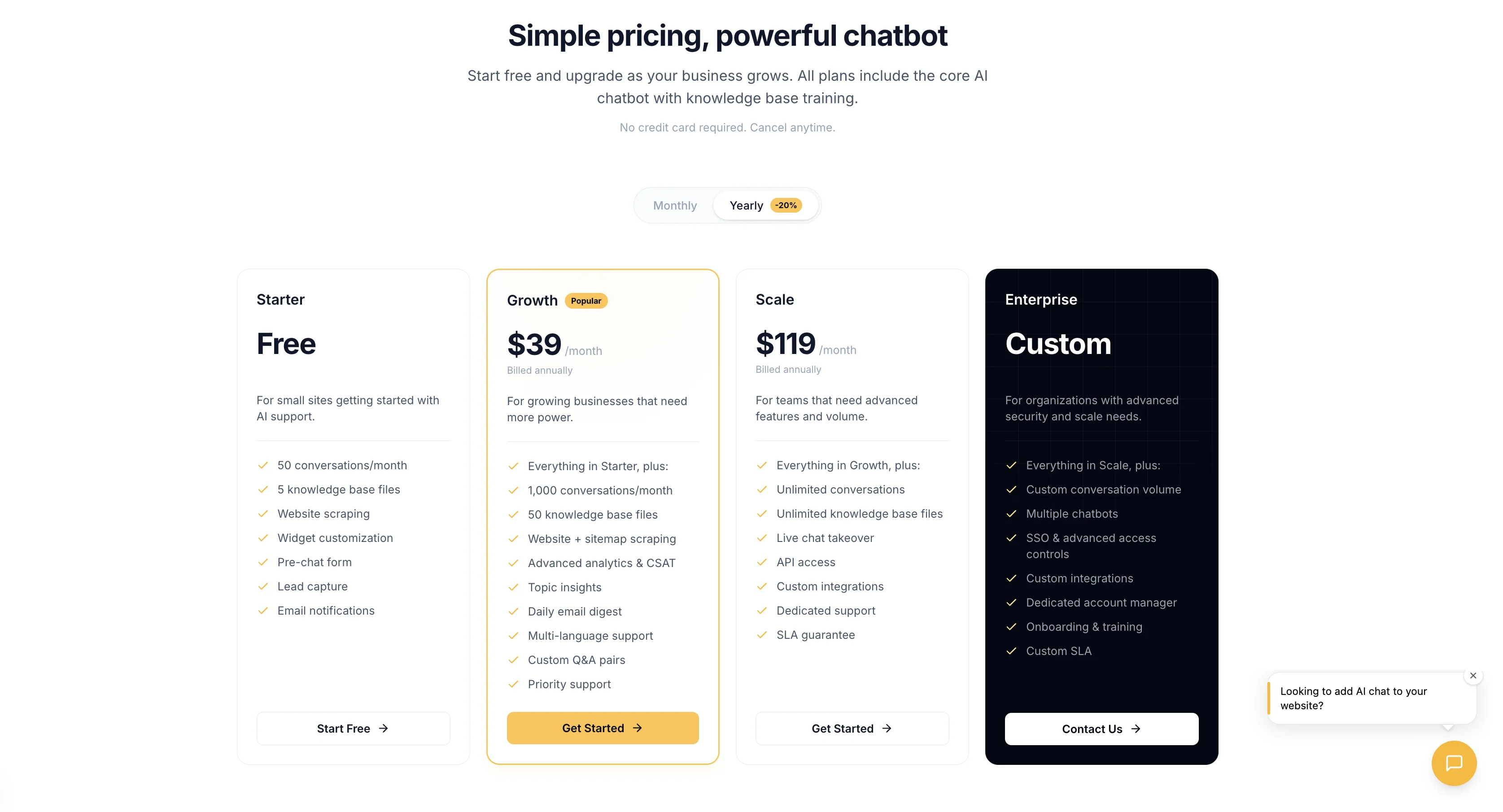
Canary uses a flat all-in model — no separate LLM billing surprises. See full pricing →
| Plan | Price | Tenants | Conversations |
|---|---|---|---|
| Starter | Free trial | 1 | Limited |
| Growth | $49/month | Up to 3 | Included |
| Scale | $127/month | Up to 10 | Included |
| Agency | Custom | Unlimited | Custom |
Running Canary for 10 client tenants costs approximately $127/month total — not per tenant. OpenAI API costs are included in the platform fee at standard usage levels.
What's always included (every paid plan):
- Unlimited knowledge base uploads
- Live chat handoff with email notifications
- Lead capture and CSAT
- Multi-language support
- Widget white-labeling
- Source citations
- Conversation export
- Per-tenant analytics
- Daily email digest
Winner: Canary — flat pricing, no surprise AI Spend bills, white-labeling included.
Try it yourself
Your current support metrics
Canary is free on Starter, or $49/mo on Growth
Your projected savings
Monthly savings
$551
Annual savings
$6,612
ROI
1124%
Payback period
3 days
Tickets automated/mo
225
Hours saved/mo
30h
Based on industry averages. Actual results may vary depending on your chatbot configuration, knowledge base quality, and customer query complexity.
Ready to stop guessing at your chatbot bill? Try Canary free → — No credit card required. Up and running in 5 minutes.
Integrations Comparison
| Integration Category | Canary | Botpress |
|---|---|---|
| Web chat widget | ✅ | ✅ |
| Planned | ✅ | |
| Facebook Messenger | Planned | ✅ |
| Planned | ✅ | |
| Slack | ❌ | ✅ |
| Microsoft Teams | Planned | ✅ |
| Telegram | Planned | ✅ |
| HubSpot CRM | Planned | ✅ (custom dev) |
| Salesforce | Planned | ✅ (custom dev) |
| Zendesk | Planned | ✅ (custom dev) |
| Calendly / Cal.com | Planned | ✅ (custom dev) |
| Zapier | Planned | ✅ |
| OpenAI | ✅ | ✅ |
| Anthropic | Planned | ✅ |
| Firecrawl (web scraping) | ✅ | ✅ (via Apify) |
| Resend (email) | ✅ | ✅ (custom dev) |
| REST API | ✅ | ✅ |
| Webhook support | ✅ | ✅ |
Botpress wins on breadth with 200+ integrations in their Hub. Note that many CRM and helpdesk connections listed as "custom dev" require JavaScript in Botpress's sandbox — they're not point-and-click configurations. Canary's integration set is narrower but works out of the box; the roadmap prioritizes CRM and helpdesk connectivity based on customer demand.
Pros and Cons
Botpress
Pros:
- Open-source core with full self-hosting option
- 200+ integrations via Hub marketplace
- Powerful visual flow builder for complex conversation logic
- JavaScript sandbox for unlimited custom logic
- Multi-LLM support (OpenAI, Anthropic, Groq, Hugging Face)
- Multi-channel deployment (WhatsApp, Instagram, Teams, Slack, Telegram)
- Strong developer community (30,000+ Discord members)
- Enterprise-grade security (SOC 2, GDPR on Enterprise plan)
- 300,000+ builders validate the ecosystem maturity
- Active product development with $25M Series B backing
Cons:
- Steep learning curve — JavaScript required for real-world bots
- AI Spend capped at $100–$500/month per plan — limits bot capability at high volume
- Live handoff locked behind Plus plan ($89/month minimum)
- Multi-tenant use cases require custom engineering per client
- Custom analytics dashboards locked to Team plan ($495/month)
- White-label widget requires paid plan
- Enterprise contracts require 3-year minimum commitments
- Enterprise first-year TCO estimated at $25,000–$40,000
Canary
Pros:
- Five-minute setup with guided onboarding wizard
- Flat, predictable monthly pricing — no AI Spend surprises
- Native multi-tenant architecture with per-tenant isolation
- 4KB Preact widget — lightweight, Core Web Vitals-friendly
- All core features available on every plan (no feature gating)
- Live handoff + CSAT + lead capture + per-tenant analytics included
- White-labeling without a paid upgrade
- Built-in source citations
Cons:
- Newer product — fewer integrations than Botpress today
- No WhatsApp/Instagram/Teams support yet (planned)
- Limited to web chat widget in current release
- Smaller community than Botpress's 30,000+ Discord
- No open-source option or self-hosting
- No visual flow builder (AI-driven, not script-driven)
Feature-by-Feature Comparison
| Feature | Canary | Botpress |
|---|---|---|
| Setup time | ~5 minutes | Hours to days |
| Technical skill required | None | JavaScript + API experience |
| Knowledge base | ✅ Files + URLs + Sitemaps | ✅ Files + URLs + Notion + Tables |
| Vector search | ✅ OpenAI Vector Stores | ✅ Built-in RAG |
| Confidence threshold | ✅ Configurable slider | ✅ Available |
| Multi-tenant isolation | ✅ Built-in, automatic | ❌ Requires custom engineering |
| Live agent handoff | ✅ All plans | ✅ Plus plan and above only |
| Lead capture form | ✅ Pre-chat form | ✅ With configuration |
| CSAT ratings | ✅ Built-in | ✅ With configuration |
| Conversation starters | ✅ Configurable | ✅ Available |
| AI follow-up questions | ✅ Automatic | ✅ With AI Tasks |
| Proactive trigger messages | ✅ URL/delay rules | ✅ Plus plan |
| Source citations | ✅ Built-in toggle | ⚙️ Requires configuration |
| Multilingual support | ✅ 100+ languages | ✅ 100+ languages |
| Widget white-labeling | ✅ All plans | ✅ Plus plan required |
| Widget bundle size | 4KB (Preact) | Not publicly documented |
| Analytics dashboard | ✅ All plans | ✅ Basic (custom on Team+) |
| Per-tenant analytics | ✅ Built-in | ❌ Not available |
| Topic classification | ✅ GPT-powered | ❌ Not built-in |
| Daily email digest | ✅ Opt-in | ❌ Not available |
| Conversation export (CSV) | ✅ Built-in | ⚙️ Requires Zapier/custom |
| Sitemap import | ✅ Auto-detection | ✅ With crawler setup |
| Visual flow builder | ❌ AI-driven only | ✅ Full visual editor |
| JavaScript sandbox | ❌ | ✅ |
| Multi-LLM support | OpenAI (more planned) | OpenAI + Anthropic + Groq + HF |
| WhatsApp channel | ❌ (planned) | ✅ |
| Instagram channel | ❌ (planned) | ✅ |
| Slack channel | ❌ | ✅ |
| Microsoft Teams channel | ❌ (planned) | ✅ |
| SOC 2 compliance | ✅ Via Supabase | ✅ Enterprise plan only |
| Open-source option | ❌ | ✅ |
| Self-hosting | ❌ | ✅ |
| Pricing model | Flat monthly | Platform + AI Spend |
| White-label for 10 clients | ~$127/month | $495–$995+/month |
| G2 rating | New | 4.5/5 (419+ reviews) |
| Capterra rating | New | 4.5/5 (230+ reviews) |
Who Should Use Each Platform
Use Canary if you:
- Run a SaaS product and need a chatbot embedded for multiple customers
- Operate a digital agency serving 5–50 client sites
- Want to be live in under an hour without writing code
- Need predictable monthly costs you can pass through to clients
- Care about widget performance (Core Web Vitals, Lighthouse scores)
- Want lead capture, CSAT, handoff, and analytics all working without configuration
- Are tired of surprise invoices from usage-based LLM billing
Use Botpress if you:
- Have a developer (or are one) comfortable with JavaScript
- Need complex, branching conversation flows where scripted logic beats LLMs
- Want to deploy across WhatsApp, Instagram, Teams, and Telegram today
- Need Anthropic Claude, Groq, or Hugging Face models
- Want to self-host or run on-premises for data residency requirements
- Are building a sophisticated enterprise bot with custom Salesforce, Zendesk, or Jira integrations
Not ideal for
Canary is not the right fit if you:
- Need WhatsApp or Instagram channels right now (in development)
- Want a visual flow builder for complex scripted dialogue trees
- Require self-hosting due to data residency regulations
- Need multi-LLM support across Anthropic/Groq/Hugging Face
Botpress is not ideal if you:
- Want to deploy across 10+ client sites without custom engineering
- Need predictable, flat monthly pricing
- Are a non-technical founder without developer resources
- Want live agent handoff without paying $89/month
- Need per-tenant analytics isolation out of the box
Frequently Asked Questions
1. Is Botpress actually free? Botpress has a free tier ($0/month platform fee), but it includes only 500 messages/month, 1 bot, and 1 seat — plus $5 in AI credits that runs out quickly with any real usage. Intelligent actions (KB queries, AI transitions, response generation) consume AI Spend billed separately on top of the platform fee. For meaningful production use, expect $50–$100/month in AI Spend even on the free tier.
2. How much does Botpress really cost per month? At Plus ($89/month + AI Spend capped at $100), realistic totals run $140–$189/month. At Team ($495/month + AI Spend capped at $500), expect $650–$995/month. Enterprise starts at $2,000+/month on 3-year contracts, not including AI Spend. First-year total cost for enterprise deployments (including implementation) is commonly estimated at $25,000–$40,000.
3. What is Botpress AI Spend, and is there a cap? AI Spend is a separate variable cost for LLM token usage — every knowledge base query, AI transition, response generation, and translation consumes tokens billed at provider rates. There are caps: $100/month on PAYG and Plus plans, $500/month on the Team plan. These caps limit your maximum bill, but they also stop the bot from using AI once reached. Botpress has an AI Spend Calculator to help estimate costs pre-launch, though the estimates require you to know your expected conversation volume and query mix in advance.
4. Does Botpress support multi-tenant deployments? Not natively. Botpress models everything as separate "bots" within an account. Per-tenant data isolation — separate knowledge bases, analytics, conversation history — requires custom engineering. Most agencies running multiple clients on Botpress maintain separate accounts per client, which multiplies subscription costs.
5. Does Botpress support live agent handoff? Yes, but only on the Plus plan ($89/month) and above. The free tier has no live agent handoff. Integrating with external helpdesks like Zendesk requires custom JavaScript development, not plug-and-play configuration.
6. Can I use Botpress without coding? Botpress markets itself as "low-code" — not "no-code." Basic flows are approachable in Agent Studio, but production-quality bots with real business logic require JavaScript development experience. Reviewers consistently flag the learning curve as the primary pain point for non-technical users. If you need a no-code solution, Canary is purpose-built for that use case.
7. What are the main disadvantages of Botpress? The core pain points: (1) AI Spend billed on top of the platform fee, capped in ways that can limit the bot mid-month at high volume; (2) steep learning curve requiring JavaScript for anything beyond demos; (3) no native multi-tenant architecture — agencies must build isolation or maintain separate accounts per client; (4) live handoff, white-labeling, and custom analytics are all paywalled; (5) enterprise pricing starts at $2,000+/month with 3-year minimum contracts.
8. Is Botpress secure or SOC 2 compliant? SOC 2 Type II compliance, data residency options, SSO, SCIM, and audit logs are available on Botpress's Enterprise plan only. Standard tiers (PAYG, Plus, Team) run on shared cloud infrastructure without custom data retention or residency policies. For regulated industries requiring strict data isolation or on-premises hosting, Botpress Enterprise or self-hosted deployment is required.
9. Is Botpress open-source? Yes, Botpress has an open-source core on GitHub. The cloud platform (Agent Studio, managed hosting, integrations hub) is proprietary SaaS. Self-hosting the open-source version requires significant DevOps expertise and does not include all cloud features.
10. What LLMs does Botpress support? Botpress supports OpenAI (GPT-4o, GPT-4.1, and others), Anthropic Claude, Groq, and Hugging Face models. Custom LLM endpoints are available on Enterprise plans. Standard plans default to OpenAI.
11. How does Canary compare to Botpress for agencies running multiple client sites? This is where the gap is largest. On Botpress's Team plan ($495/month), you get 3 bots — add 7 more at $10/each ($70) plus AI Spend capped at $500, and a 10-client deployment costs $650–$995+/month before implementation overhead. Canary's Scale plan handles 10 tenants at $127/month total, with built-in knowledge base isolation, per-tenant analytics, and separate widget configurations — no engineering required.
12. Can I migrate from Botpress to Canary? If you're using Botpress primarily for web chat with knowledge base Q&A, migration is straightforward: export your documents, upload them to Canary's knowledge base, configure your system prompt and widget, and swap the embed snippet. One agency that made the switch described it as "a Friday afternoon project" — compared to the weeks their original Botpress setup had taken. Custom JavaScript flow logic and multi-channel automations (WhatsApp, Messenger) would need to be rebuilt or deferred until Canary's channel roadmap ships.
Conclusion
Botpress has earned its reputation. For developer teams building complex, multi-channel chatbot experiences — especially those requiring WhatsApp, self-hosting, Anthropic models, or deeply custom conversation logic — it remains the strongest open-source option in the market.
But for SaaS companies and agencies, the math changes fast. AI Spend adds up and hits a cap that limits your bot mid-month at scale. Multi-tenant isolation requires custom engineering. Live handoff, white-labeling, and analytics are paywalled behind $89–$495/month tiers. And the $25,000–$40,000 first-year enterprise TCO is real even for teams that never end up on an enterprise contract.
Canary solves a different problem: getting production-grade chatbots live across multiple client sites this week, without a developer dependency or a surprise invoice. At $127/month for 10 tenants — with built-in knowledge base isolation, live handoff, CSAT, per-tenant analytics, and white-labeling included — it's not competing with Botpress on raw capability. It's competing on what actually matters for agencies and SaaS teams: speed, predictability, and zero ongoing maintenance.
Ready to see the difference?
Try Canary free → — No credit card required. Up and running in 5 minutes.
See how it works → — Learn how a multi-tenant deployment works.
Last updated: March 2026. Botpress pricing and feature details sourced from botpress.com/pricing, G2 (419+ reviews), and Capterra (230+ reviews). Pricing subject to change — verify current rates at botpress.com before purchasing.