Crisp Alternative — Canary: AI Chatbot, No €95/mo Live Chat
Crisp alternative without the live chat bundle. Canary: AI chatbot at $49/mo vs Crisp's €95/mo Hugo plan. Multi-tenant, lead capture, 10-min setup.
Crisp is a well-liked live chat and customer messaging platform for lean support teams. Canary is an AI-first chatbot platform built for businesses that want their website to answer questions automatically — 24/7, trained on their own content, without agents in the loop for routine inquiries.
This guide breaks down exactly where each tool excels and where it falls short — with real pricing, verified features, and an honest look at both platforms' AI capabilities.
Quick Verdict
| Category | Canary | Crisp |
|---|---|---|
| AI Chatbot Quality | 9/10 | 7/10 |
| Pricing & Predictability | 9/10 | 6/10 |
| Ease of Setup | 10/10 | 8/10 |
| Live Chat / Human Handoff | 7/10 | 10/10 |
| Knowledge Base Training | 9/10 | 7/10 |
| Widget Performance | 10/10 | 6/10 |
| Multi-tenant / Multi-site | 10/10 | 4/10 |
| Analytics | 8/10 | 6/10 |
Bottom line: If your primary goal is AI-automated support — where the chatbot handles most conversations without human agents — Canary is the better tool. If your primary goal is live chat with human agents, rich omnichannel messaging, and co-browsing, Crisp is excellent.
What Is Crisp?
Crisp (crisp.chat) is a customer messaging platform founded in 2015, headquartered in France. It's built around a shared agent inbox that unifies live chat, email, WhatsApp, Instagram DMs, Telegram, and a dozen other channels in one interface.
Crisp competes squarely with Intercom and Freshdesk in the "lightweight helpdesk" category. It's popular with startups and SMBs because its flat per-workspace pricing is more predictable than per-seat tools like Zendesk or Intercom at scale.
Its standout live chat features are genuinely strong: real-time visitor co-browsing (MagicBrowse, available on Essentials and Plus), audio/video calling from chat, a unified omnichannel inbox, and a functional free plan for 2 agents.
Crisp's current AI product is Hugo AI Agent — not a visual flow builder. Hugo can be trained on your knowledge base articles, website pages, uploaded files (TXT, CSV, PDF), and custom Q&A snippets. It autonomously resolves approximately 40% of incoming conversations without human intervention. Hugo supports multiple AI models: OpenAI GPT-5, Anthropic Claude Sonnet/Haiku, Mistral Large/Medium (EU-hosted), Google Gemini (preview), and Crisp's own internal model hosted on Scaleway in Paris for maximum GDPR compliance. Hugo also ships pre-configured MCP integrations for Shopify, WooCommerce, PrestaShop, Stripe, and Status Page — enabling it to look up orders, fetch account details, and process actions within rules you define.
Where Crisp's AI has real limitations: data source quotas by plan (Mini: 1 domain; Essentials: 3 domains, 5 files; Plus: 10 domains, 100 files), no in-widget source citations showing users where answers came from, no confidence threshold controls to suppress low-quality answers, and no per-tenant KB isolation for multi-site deployments.
Crisp is best for: Small to mid-size teams with dedicated support agents who want unified messaging across channels, with AI as an assist and autonomous triage layer.
Crisp is not ideal for: Agencies or SaaS platforms managing multiple client sites (per-workspace billing compounds fast), or teams that need granular AI controls like confidence thresholds and in-widget citations.
What Is Canary?
Canary is an AI chatbot platform built for businesses that want their website to answer support questions automatically — trained on their own content, with human handoff when needed.
You train Canary by giving it your documentation, URLs, PDFs, DOCX, CSV, or XLSX files. That content is indexed into OpenAI Vector Stores and searched semantically in real-time to generate accurate, cited answers. No flow builder. No scripted paths.
Key architectural differentiators:
- 4KB Preact widget — one of the smallest chat widget footprints on the market
- 5-minute setup — paste a script tag; the widget is live
- Per-tenant isolation — built for agencies and SaaS platforms; each tenant has separate vector stores, configurations, and analytics
- OpenAI Vector Stores + file_search — full semantic vector retrieval, not keyword matching
- In-widget source citations — shows users which document the answer came from, building trust and reducing hallucinations
- Confidence threshold — suppress answers below a configurable score; the bot acknowledges uncertainty rather than guessing
- ~$127/mo infrastructure cost for 10 tenants — purpose-built for multi-tenant efficiency
See how Canary trains on your content →
Feature Deep-Dive: Canary vs Crisp
1. AI Chatbot & Automation
Crisp — Hugo AI Agent:
Crisp's current AI product is Hugo AI Agent, launched and iterated significantly heading into 2026. Hugo is trained on four data source types: knowledge base articles (auto-synced in real-time), website pages (crawled by domain), uploaded files (TXT, CSV, PDF), and Q&A snippets. It autonomously resolves ~40% of conversations without escalation.
Hugo's model flexibility is a genuine strength — you can choose from GPT-5, Claude Sonnet/Haiku, Mistral (EU-hosted), Gemini, or Crisp's own Paris-hosted model. For businesses with GDPR or data residency requirements, the EU-hosted options are a differentiator.
The practical limitations show up in the data source quotas: Mini gets 1 domain; Essentials gets 3 domains and 5 files; Plus gets 10 domains and 100 files. A SaaS company with a large documentation site or multiple product lines may hit these ceilings. There are also no in-widget source citations — users see the answer, but not where it came from. And there's no confidence threshold mechanism — Hugo can answer with low-quality results and present them as confident.
The legacy visual flow builder still exists for scripted scenarios alongside Hugo.
Canary:
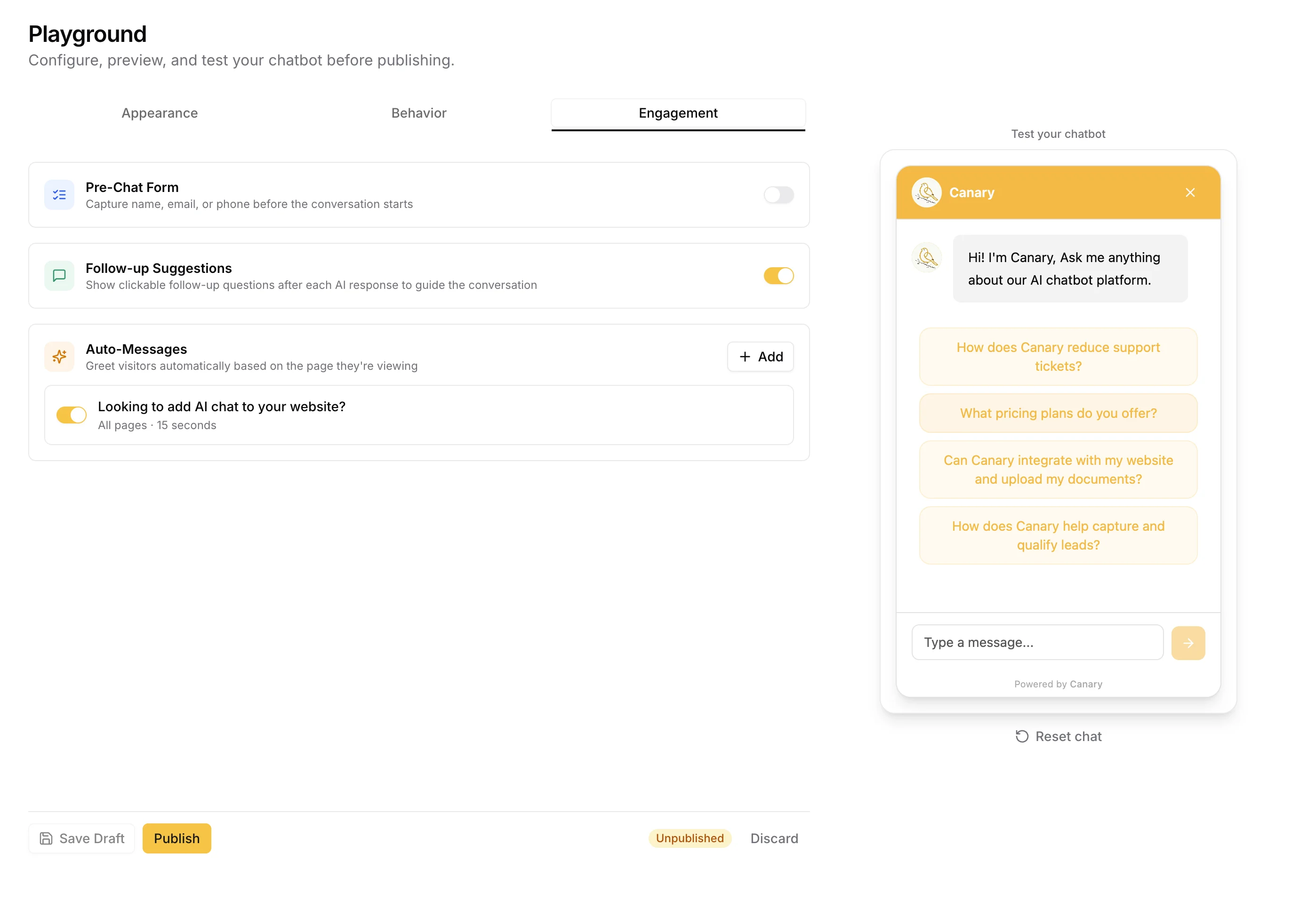
Canary's AI is trained on your content — URLs, PDFs, DOCX, CSV, XLSX files — with no per-file or per-domain caps. The chatbot immediately reflects updates when you add or modify content in the Knowledge Base. No flow builder, no manual scenario writing.
The differentiators vs. Hugo: in-widget source citations (the widget shows which document it pulled the answer from, per response), configurable confidence thresholds (low-confidence answers are suppressed — the bot acknowledges uncertainty rather than presenting a weak answer), and per-tenant KB isolation (each client site has its own separate vector store, not a shared index).
Additional AI capabilities: conversation starters, AI-generated follow-up question suggestions after each response, topic classification (auto-categorizes conversations for analytics), and confidence scoring.
Winner: Depends on use case. For AI model flexibility and MCP action integrations (order lookups, Shopify actions), Hugo has capabilities Canary doesn't. For confidence thresholds, in-widget citations, multi-tenant KB isolation, and unlimited training data, Canary has meaningful technical advantages.
2. Live Chat & Human Handoff
Crisp: Live chat is Crisp's core product. The shared inbox is excellent — multiple agents can see and manage all conversations, with collision detection preventing simultaneous replies. Internal notes, @mentions, agent assignment, read receipts, and message sneak peek (see what the visitor is typing before they submit) are all included.
Standout features on Essentials and Plus: MagicBrowse co-browsing (navigate the visitor's screen in real-time without any plugin) and built-in audio/video calling. The mobile apps (iOS and Android) are well-reviewed, making it practical for small teams to manage conversations on the go.
Canary: Live handoff exists but is not the primary use case. When the AI cannot confidently answer a question, or when a visitor explicitly requests a human, Canary triggers a handoff — email notifications are sent via Resend, and the conversation is flagged in the admin panel. Agents can review the full transcript and respond.
Canary does not have a real-time agent inbox with message sneak peek, co-browsing, or video calling. It's designed around "AI handles it first; human reviews exceptions."
Winner: Crisp — by a wide margin for live agent experience.
3. Knowledge Base & Content Training
Crisp: Includes a self-serve help center / knowledge base builder. Articles can be organized into categories and linked from the chat widget. The KB also serves as Hugo's primary training source — Hugo auto-syncs when you create or update articles. The KB supports 50+ languages.
The structural limitation: Hugo's training is capped by plan (Essentials: 3 domains, 5 files; Plus: 10 domains, 100 files). For businesses with large documentation sites, these caps can be restrictive. There are also no in-widget source citations — users receive answers without knowing which article they came from.
Canary: The Knowledge Base is the chatbot's training source, with no file or domain caps. Every file you upload (PDF, DOCX, CSV, XLSX), every URL you scrape (including sitemap-based batch import), and every Q&A pair you add becomes part of the vector index the AI searches in real-time.
URL scraping uses Firecrawl with sitemap auto-detection — point Canary at your sitemap and it bulk-imports all pages in one step. Confidence threshold controls prevent low-quality answers from surfacing. In-widget source citations show users exactly which document was referenced.
Winner: Canary — no training data caps, in-widget citations, confidence thresholds, and per-tenant KB isolation are genuine advantages over Hugo's plan-based limits.
4. Widget Performance & Installation
Crisp: The widget loads from Crisp's CDN via an async JavaScript snippet. Multiple user reviews on G2 and Capterra flag noticeable load latency, with Core Web Vitals impact cited as a concern for landing pages. Installation is straightforward — a snippet in the <head> or via a tag manager. Crisp has native plugins for WordPress, Shopify, Webflow, and other CMS platforms.
Canary: The widget is built in Preact — a 4KB React-compatible library. The total widget payload is approximately 4KB, making it one of the smallest chat widgets available. For e-commerce and landing pages where page performance matters for conversion, the payload difference is significant.
Installation is a single <script> tag. The onboarding wizard takes most new users from signup to live widget in under 5 minutes.
Winner: Canary — on widget performance. Crisp — on platform integrations (WordPress plugin, Shopify native, etc.).
5. Multi-Tenant & Multi-Site Architecture
Crisp: Each workspace is a separate Crisp account at full subscription price. An agency managing 10 client sites on Crisp Essentials (€95/mo per workspace) would pay €950/mo — just for the platform. There is no multi-workspace management tier short of Enterprise (custom pricing). Per-workspace billing is one of the most consistent complaints in Crisp reviews from agencies.
Canary: Multi-tenancy is a first-class architectural feature. Each tenant has its own vector store, configuration, analytics, widget appearance, and rate limits — all within one Canary account. You can manage 10 client sites at ~$127/mo total infrastructure cost.
Tenant-level configuration includes: custom widget colors/avatar/position, language settings, AI model selection, confidence threshold, source citations toggle, proactive message triggers, CSAT ratings, lead capture forms, Q&A pairs, and daily email digest.
Winner: Canary — for agencies and SaaS platforms, Crisp's per-workspace billing becomes cost-prohibitive at scale.
6. Analytics & Reporting
Crisp: Provides conversation analytics, agent performance analytics (Essentials+), CSAT ratings, and a real-time dashboard. Reviewers describe the analytics as surface-level — volume and trends are visible, but custom segmented reports, SLA tracking, and deep CSAT analysis by agent or channel aren't available.
Canary: Analytics covers conversation volume, resolution rate, handoff rate, lead capture, CSAT (thumbs up/down per conversation), topic distribution (GPT-powered classification of what users are asking about), and funnel analytics with period-over-period comparison.
Topic insights mean you know what users are asking and how that shifts week over week — not just conversation volume.
Winner: Draw — Crisp is more mature on agent-performance analytics; Canary is more useful for AI-specific metrics and topic intelligence.
Pricing Breakdown
Crisp Pricing (2026)
| Plan | Monthly Price | Agents | AI (Hugo) | Key Limitations |
|---|---|---|---|---|
| Free | €0 | 2 | ❌ | No AI, basic chat only, limited history |
| Mini | €45/mo | 4 | ~90 convos/mo | 1 domain, 1 file, no co-browsing |
| Essentials | €95/mo | 10 | ~$25 credits/mo | 3 domains, 5 files, co-browsing, WhatsApp |
| Plus | €295/mo | 20 | Unlimited | 10 domains, 100 files, ticketing, white-label |
| Enterprise | Custom | Unlimited | Unlimited | Custom everything |
Key pricing notes:
- Pricing is per workspace — agencies managing multiple sites pay per workspace
- Additional seats: only available on Plus, at €10/agent/month extra
- The jump from Essentials (€95) to Plus (€295) is the sharpest sticker-shock point in Crisp reviews — no middle tier exists
- Hugo AI has its own credit/billing system on top of the base plan: Mini includes ~90 AI-resolved conversations/month, Essentials includes ~$25/month in AI credits; Plus is unlimited AI resolutions
- Startup program: 30% lifetime discount for companies with under $1M in funding and under 3 years old (contact via live chat to apply, Essentials and Plus only)
- Free plan has limited conversation history retention; unlimited history starts at Mini
For a team of 8 agents wanting real AI capabilities: You'd need Plus at €295/mo. Essentials' AI credits (~$25/mo) cover only a fraction of serious support volume.
For an agency with 5 client sites on Essentials: €95 × 5 = €475/mo just for the platform, before any agent seats.
Canary Pricing
Canary is priced around infrastructure and usage — not seat counts or workspace multiples.
| What You Get | Cost |
|---|---|
| Self-hosted infrastructure (Render API) | ~$7/mo |
| 10-tenant deployment (total infra) | ~$127/mo |
| Per-tenant agents | $0 (no seat fees) |
| AI usage | Included (your OpenAI API key) |
| Knowledge base storage | Included (OpenAI Vector Stores) |
Because Canary is open-architecture — you bring your own OpenAI API key — AI usage scales with what you actually consume, not a vendor's per-resolution markup or credit system. You pay OpenAI's API rates directly.
Try it yourself
Your current support metrics
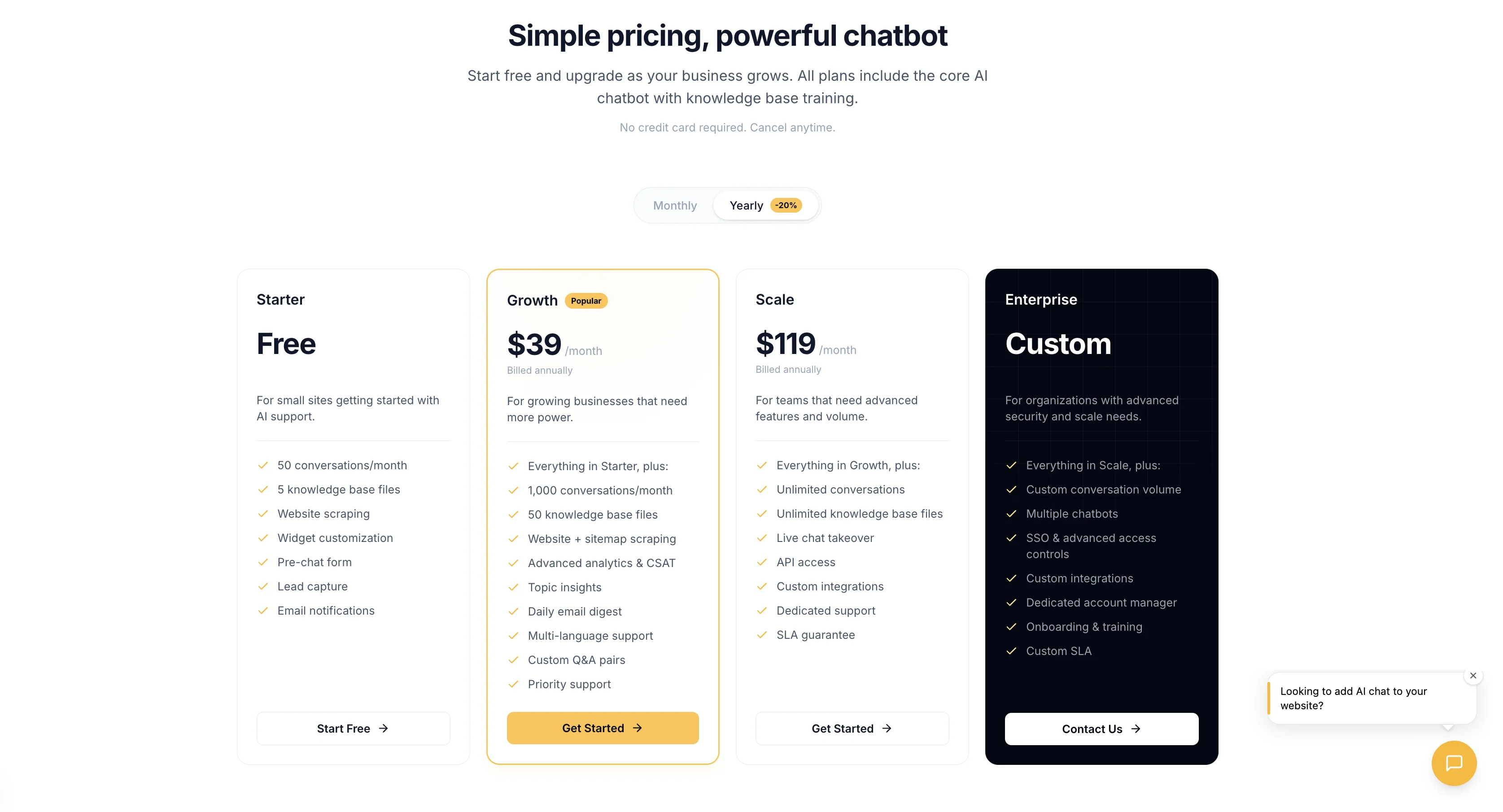
Canary is free on Starter, or $49/mo on Growth
Your projected savings
Monthly savings
$551
Annual savings
$6,612
ROI
1124%
Payback period
3 days
Tickets automated/mo
225
Hours saved/mo
30h
Based on industry averages. Actual results may vary depending on your chatbot configuration, knowledge base quality, and customer query complexity.
For an agency managing 10 client sites:
- Crisp Essentials: €950/mo (10 workspaces × €95) — plus Hugo AI credit overages at volume
- Canary: ~$127/mo infrastructure + OpenAI API usage
Multi-tenant use is where Canary's architecture creates a genuine economic advantage.
Ready to see the cost difference for your use case? Try Canary free →
Integrations Comparison
| Category | Canary | Crisp |
|---|---|---|
| CRM | API-first (webhook output) | HubSpot, Salesforce, Pipedrive, Zoho, Dynamics 365 |
| Resend (transactional, digest) | Gmail (shared inbox), custom SMTP | |
| E-Commerce | Webhook → any platform | Shopify, WooCommerce, Magento, PrestaShop |
| CMS | Script tag (any CMS) | WordPress plugin, Webflow, Joomla |
| Messaging Channels | Website widget only | WhatsApp, Instagram, Facebook, Telegram, Viber, Line, SMS, Discord |
| Automation | Webhooks, REST API | Zapier, Make, n8n, Segment |
| AI / LLMs | OpenAI (native, BYOK) | GPT-5, Claude, Mistral, Gemini, Crisp EU model |
| E-Commerce AI Actions | Not available | Shopify, WooCommerce, Stripe, PrestaShop via MCP |
| Analytics | Native + REST | Operator Analytics plugin, HockeyStack |
| Telephony | Not available | Aircall, Ringover |
| Co-browsing / Video | Not available | MagicBrowse + calls (Essentials+ only) |
| Ticketing | Not available | Plus plan only (€295/mo) |
Honest assessment: Crisp has a significantly larger integration ecosystem — 50+ native integrations, omnichannel connections, and Hugo's MCP action integrations for e-commerce. Canary's API-first architecture means integrations are possible via webhooks and REST, but require more developer effort. If native Shopify, WhatsApp, or Stripe order-lookup integrations are a requirement, Crisp has those today.
Pros & Cons
Crisp Pros
- Flat workspace pricing is predictable for single-site businesses
- Hugo AI Agent can train on KB articles, web pages, and files — no flow builder required
- Hugo supports multiple AI models: GPT-5, Claude, Mistral (EU), Gemini, proprietary EU model
- Hugo MCP integrations enable real AI actions (order lookup, refunds via Shopify/Stripe)
- Unified omnichannel inbox (WhatsApp, Instagram, email, live chat in one view)
- MagicBrowse co-browsing and audio/video calling (Essentials+)
- Free plan is genuinely usable (2 agents, core live chat)
- Mobile apps (iOS + Android) are solid for managing conversations on the go
- 30% lifetime startup discount for eligible companies
- Large native integration ecosystem (Zapier, Make, Shopify, HubSpot, Salesforce, etc.)
- 50+ language support for knowledge base
Crisp Cons
- Hugo AI data source limits by plan (Essentials: 3 domains, 5 files; Plus: 10 domains, 100 files)
- Hugo AI credits are a separate billing layer on top of the base plan price
- €95 → €295 pricing cliff with no middle tier; forces expensive upgrades for AI volume
- Multi-workspace billing compounds costs for agencies and multi-brand businesses
- No in-widget source citations — users don't see where answers came from
- No confidence threshold controls — Hugo can serve low-quality answers without flagging them
- No per-tenant KB isolation — not architected for multi-site deployments
- Widget load latency reported by multiple users (Core Web Vitals impact)
- Ticketing system locked behind the most expensive plan (€295/mo)
- Weak advanced analytics — no SLA tracking, no custom report builder
Canary Pros
- AI trained directly on your content — no flow building required
- No KB file or domain caps — unlimited training data per tenant
- In-widget source citations show users which document was referenced
- Confidence threshold controls suppress low-quality answers before they're shown
- 4KB Preact widget — minimal page weight, no Core Web Vitals impact
- Multi-tenant architecture — 10 client sites at ~$127/mo total infra
- Per-tenant vector store isolation — separate KB, config, and analytics per client
- Bring-your-own OpenAI API key — no per-resolution markup, no credit caps
- Topic insights (GPT-powered auto-classification), proactive messages, CSAT, lead capture
- Daily email digest and conversation starters included
Canary Cons
- No native omnichannel (WhatsApp, Instagram, Telegram not available)
- No real-time agent co-browsing or video calling
- No AI action integrations (can't look up orders or trigger Stripe refunds like Hugo MCP)
- Smaller native integration ecosystem (API-first — not plug-and-play for non-developers)
- No ticketing system
- No mobile app — admin is browser-only
- No CRM native integrations — requires API/webhook development
- Brand new product — no established track record of public reviews on G2 or Capterra yet
- Requires managing an OpenAI API key as an additional vendor relationship
Feature-by-Feature Comparison Table
| Feature | Canary | Crisp Free | Crisp Mini | Crisp Essentials | Crisp Plus |
|---|---|---|---|---|---|
| AI chatbot (document-trained) | ✅ | ❌ | ✅ (1 domain, 1 file) | ✅ (3 domains, 5 files) | ✅ (10 domains, 100 files) |
| AI chatbot (flow-based / legacy) | ❌ | ❌ | ❌ | ✅ | ✅ |
| In-widget source citations | ✅ | ❌ | ❌ | ❌ | ❌ |
| Confidence threshold controls | ✅ | ❌ | ❌ | ❌ | ❌ |
| Per-tenant KB isolation | ✅ | ❌ | ❌ | ❌ | ❌ |
| Unlimited KB files | ✅ | ❌ | ❌ | ❌ | ❌ |
| AI reply suggestions for agents | ❌ | ❌ | ✅ | ✅ | ✅ |
| AI conversation summaries | ❌ | ❌ | ✅ | ✅ | ✅ |
| Multi-model AI (GPT/Claude/Mistral) | ❌ (OpenAI only) | ❌ | ✅ | ✅ | ✅ |
| AI e-commerce actions (MCP) | ❌ | ❌ | ✅ | ✅ | ✅ |
| Live chat (shared agent inbox) | Handoff only | ✅ (2 agents) | ✅ (4 agents) | ✅ (10 agents) | ✅ (20 agents) |
| Message sneak peek | ❌ | ❌ | ❌ | ✅ | ✅ |
| Co-browsing (MagicBrowse) | ❌ | ❌ | ❌ | ✅ | ✅ |
| Audio/video calling | ❌ | ❌ | ❌ | ✅ | ✅ |
| WhatsApp Business | ❌ | ❌ | ❌ | ✅ | ✅ |
| Instagram DMs | ❌ | ❌ | ❌ | ✅ | ✅ |
| Facebook Messenger | ❌ | ❌ | ❌ | ✅ | ✅ |
| Email shared inbox | ❌ | ❌ | ❌ | ✅ | ✅ |
| Ticketing system | ❌ | ❌ | ❌ | ❌ | ✅ |
| Multi-tenant management | ✅ (native) | ❌ | ❌ | ❌ | ❌ |
| Per-tenant configuration | ✅ | ❌ | ❌ | ❌ | ❌ |
| Widget performance (payload) | ✅ 4KB | ⚠️ Heavy | ⚠️ Heavy | ⚠️ Heavy | ⚠️ Heavy |
| Proactive messages (URL triggers) | ✅ | ✅ (basic) | ✅ | ✅ | ✅ |
| Conversation starters | ✅ | ❌ | ❌ | ❌ | ❌ |
| CSAT / chat rating | ✅ | ❌ | ✅ | ✅ | ✅ |
| Lead capture form | ✅ | ✅ | ✅ | ✅ | ✅ |
| Topic insights (AI classification) | ✅ | ❌ | ❌ | ✅ | ✅ |
| Daily email digest | ✅ | ❌ | ❌ | ❌ | ✅ |
| Conversation CSV export | ✅ | ❌ | ✅ | ✅ | ✅ |
| White-label / remove branding | ✅ | ❌ | ❌ | ❌ | ✅ |
| HubSpot integration | ❌ (API) | ❌ | ❌ | ✅ | ✅ |
| Shopify integration | ❌ (script tag) | ✅ | ✅ | ✅ | ✅ |
| Zapier / Make | ❌ (API) | ❌ | ❌ | ✅ | ✅ |
| GDPR compliant | ✅ | ✅ | ✅ | ✅ | ✅ |
| Mobile app (iOS / Android) | ❌ | ✅ | ✅ | ✅ | ✅ |
| REST API | ✅ | ✅ | ✅ | ✅ | ✅ |
| Webhooks | ✅ | ✅ | ✅ | ✅ | ✅ |
Best For / Not Ideal For
Choose Canary if:
- You want your website to answer questions automatically, without agents staffed for real-time chat
- You manage multiple client sites or SaaS tenants and need per-tenant KB isolation on a single account
- You care about widget performance — 4KB vs. heavier widgets that impact Core Web Vitals
- Your content changes frequently and you need the chatbot to reflect updates without manual flow edits
- You want transparent AI — source citations in-widget, configurable confidence thresholds
- You're an agency building AI chatbots for clients at a price that scales with tenants, not workspaces
- You want predictable AI costs (your own OpenAI API key, no per-resolution credit system)
Choose Crisp if:
- Your primary model is human agents in a real-time chat inbox — Crisp's shared inbox is best-in-class
- You need omnichannel — WhatsApp Business, Instagram DMs, Telegram, Facebook Messenger in one inbox
- You need AI that can take actions — Hugo's MCP integrations let the bot look up orders, check accounts, and process Shopify/Stripe operations
- You want multi-model AI flexibility — choose from GPT-5, Claude, Mistral, or a GDPR-compliant EU-hosted model
- You need native integrations (Shopify, HubSpot, Salesforce, Zapier, Pipedrive) without API development
- You're managing a startup or small business with 2–10 agents who handle support manually
Neither is ideal if:
- You need enterprise ticketing with SLA tracking → consider Zendesk
- You need in-app product tours and onboarding flows → consider Intercom
- You need voice/phone support → consider Aircall or Five9 alongside your chat tool
Switching from Crisp to Canary
If you're migrating from Crisp, here's what to expect:
What carries over: Conversation history lives in Crisp's database — you can export your data from the Crisp admin panel before switching. Canary doesn't import Crisp conversation history, but your lead information can be re-created from exports.
What doesn't carry over: Hugo AI training data (KB articles, file uploads) needs to be re-uploaded into Canary's Knowledge Base. If you have a Crisp helpdesk, export your articles and re-upload as PDFs or index the URLs via Canary's URL scraper.
Widget swap: Replace Crisp's <script> tag with Canary's. Both are single-script installations — the swap takes minutes. Test on staging before going live.
Timing: Plan for a 1–2 day overlap where both scripts are active (on different pages or a staging URL) to validate Canary's AI quality against your KB before cutting over.
Frequently Asked Questions
What is Crisp Hugo AI?
Hugo is Crisp's current AI agent — launched and actively developed as their primary AI product. It's trained on your knowledge base articles, website pages, uploaded files (TXT, CSV, PDF), and Q&A snippets. Hugo autonomously resolves approximately 40% of conversations. It supports multiple AI models: GPT-5, Claude Sonnet/Haiku, Mistral, Google Gemini, and Crisp's own EU-hosted model for GDPR-sensitive deployments. Hugo also has MCP integrations for Shopify, WooCommerce, Stripe, and PrestaShop — enabling it to perform actions like order lookup and account queries within rules you define.
Can Crisp AI resolve tickets automatically?
Yes. Hugo AI Agent resolves approximately 40% of incoming conversations without human intervention, escalating the rest to agents. Resolution rate varies by how well-trained the AI is on your content. Data source limits apply by plan: Essentials gets 3 domains and 5 files; Plus gets 10 domains and 100 files.
Is Crisp free?
Yes. Crisp's free plan supports 2 agents with core live chat features. It does not include Hugo AI, omnichannel (WhatsApp, Instagram), co-browsing, or video calling. Conversation history retention is limited on the free plan — unlimited history starts at Mini (€45/mo).
Does Crisp have a free plan forever?
Yes — Crisp's free plan is ongoing with no time limit. The free tier is genuinely functional for basic live chat with 2 agents. Hugo AI and omnichannel require a paid plan.
How much does Crisp cost per agent?
Crisp uses flat per-workspace pricing, not per-agent pricing. Mini (€45/mo) includes 4 agents. Essentials (€95/mo) includes 10 agents. Plus (€295/mo) includes 20 agents, with additional seats at €10/agent/month. For businesses comparing Crisp to per-seat tools like Zendesk or Intercom, Crisp's flat model is significantly cheaper at higher agent counts for a single site.
How much does Crisp cost?
Four tiers: Free (€0), Mini (€45/mo, 4 agents), Essentials (€95/mo, 10 agents), Plus (€295/mo, 20 agents, unlimited Hugo AI). Pricing is per workspace — multi-site businesses pay per workspace with no multi-site discount below Enterprise. Startups under $1M funding and under 3 years old qualify for a 30% lifetime discount on Essentials and Plus.
Is Crisp better than Intercom?
For live chat and omnichannel messaging at a lower price point, Crisp is a strong alternative to Intercom. Crisp has co-browsing and audio/video calling built in, and its flat workspace pricing is more predictable than Intercom's per-seat model at scale. Where Intercom wins: in-app product tours, onboarding flows, and a more mature enterprise analytics suite. For pure live chat + AI automation, Crisp competes well with Intercom — particularly on price.
Can I use Crisp for multiple websites?
Yes, but each website requires a separate Crisp workspace at full subscription cost. An agency managing 5 sites on Essentials would pay €475/mo (€95 × 5 workspaces) with no multi-site discount below Enterprise. Canary is built for multi-tenancy — 10 sites on one account at ~$127/mo total.
Does Crisp integrate with Shopify?
Yes. Crisp has a native Shopify integration that lets agents see customer order history during chat conversations. Hugo's MCP integration with Shopify goes further — the AI agent can fetch order status, account details, and delivery information autonomously.
Is Crisp GDPR compliant for US companies?
Yes. Crisp is a French company headquartered in the EU and operates under GDPR. Data processing agreements are available. For US companies with GDPR obligations (serving EU customers), Crisp's EU-hosted infrastructure is an advantage. Crisp also offers an EU-hosted AI model option (Mistral, or Crisp's internal model on Scaleway in Paris) for businesses that need data to stay in Europe. US-only companies without GDPR requirements don't need to factor this in.
Is Canary cheaper than Crisp?
For single-site use, the comparison is less clear-cut — both are affordable. For multi-site and multi-tenant deployments, Canary is significantly cheaper: ~$127/mo for 10 tenants vs. €950/mo for 10 Crisp Essentials workspaces. The gap widens when Hugo AI credit overages are factored in at high conversation volume.
Which has better AI — Canary or Crisp?
It depends on what "better AI" means. Hugo AI Agent can take real actions via MCP (order lookups, Shopify operations, Stripe), supports multiple AI models including EU-hosted options, and auto-syncs with your knowledge base. Canary's AI offers in-widget source citations (so users see where answers come from), configurable confidence thresholds (suppressing low-quality answers), unlimited training data with no file caps, and per-tenant KB isolation for multi-site deployments. For AI that can perform e-commerce actions: Hugo leads. For transparent, citation-backed answers with quality controls: Canary leads.
Which is better for e-commerce?
Crisp has the stronger e-commerce story today: native Shopify integration, Hugo's Shopify/WooCommerce/Stripe MCP actions, WhatsApp Business support. Canary's 4KB widget is better for page performance (conversion rate optimization on landing pages), and its AI can answer product and FAQ questions from your documentation. For a Shopify store with dedicated support staff who need order management in chat: Crisp wins. For a high-traffic store that needs fast-loading, automated FAQ handling: Canary wins.
Crisp vs Tidio — which is better?
Crisp and Tidio are both live chat platforms with AI tiers, but they target slightly different buyers. Crisp is stronger on omnichannel (WhatsApp, Instagram, email) and agent tooling (co-browsing, video calling). Tidio is often cited as easier to set up for small Shopify stores and has a more accessible price point for basic AI automation. For teams that primarily need live chat + omnichannel, Crisp is the more complete platform. For businesses that want AI-first automation without agents, Canary is purpose-built for that use case.
Conclusion
Crisp and Canary solve different versions of the "website communication" problem.
Crisp solves: "My support team needs to manage conversations from every channel in one inbox — with AI that can act (MCP integrations), multiple model choices, co-browsing, and efficient agent tooling." Hugo AI Agent is a real, capable AI product — not a flow builder relic. For single-site businesses with dedicated agents, Crisp is excellent.
Canary solves: "My website should answer questions automatically, with citations showing users where answers came from, confidence controls preventing bad answers, per-tenant isolation for multiple client sites, and infrastructure costs that scale with tenants rather than workspaces." For agencies, SaaS platforms, and businesses that want AI-first support at scale, Canary's architecture is built for this.
The right choice depends on where you sit:
- If your model is humans handling most conversations, with AI as a co-pilot that can perform e-commerce actions → Crisp is excellent.
- If your model is AI handling most conversations, with transparent citations and confidence controls → Canary is built for this.
- If you're an agency or SaaS platform managing multiple sites with per-tenant isolation → Crisp's per-workspace billing becomes prohibitive; Canary's multi-tenant architecture is the practical choice.
If you're currently on Crisp's Essentials plan feeling constrained by Hugo's data source limits (3 domains, 5 files), the lack of in-widget citations, or the per-workspace billing model as you scale to more clients — Canary is worth a close look.
Try Canary free — get your AI chatbot live in 5 minutes, trained on your own content, with source citations and confidence controls built in.
See how it works — learn how Canary answers questions from a real knowledge base, with source citations and confidence controls.
Last updated: March 2026. Crisp pricing and features sourced from crisp.chat/en/pricing/ and Crisp's official help documentation. Hugo AI Agent data from help.crisp.chat. Review data sourced from G2 and Capterra. Feature availability verified against Crisp's public plan documentation.