Chatbot Lead Generation: How We Tripled Conversions
We replaced our contact form with a chatbot lead generation system trained on our product docs. Conversion tripled in 60 days. Real numbers and exact playbook.
For three years, our contact form sat at the bottom of every landing page doing what contact forms do: converting roughly 2–3% of visitors into leads, while the other 97% quietly left. We told ourselves the traffic was just "browsing." We told ourselves the form was fine. Then we replaced it with an AI chatbot trained on our own product knowledge, and within 60 days, that conversion number tripled.
This is the honest account of what we did, what we learned, and why chatbot lead generation has become the single most impactful change we've made to our acquisition funnel.
Why Contact Forms Are a Lead Generation Dead End
Here is the uncomfortable math. The average contact form converts at 2–5% of page visitors. According to research published in the Harvard Business Review, the average B2B sales team takes 42 hours to respond to a new inquiry. Across multiple independent studies, a lead is 21 times more likely to be qualified if you respond within 5 minutes (MIT Lead Response Management Study, Dr. James Oldroyd), and nearly 7 times more likely if you respond within the first hour (Harvard Business Review, 2,241-company study).
A visitor arrives at your site, interested enough to reach out, fills in a form at 9pm on a Tuesday, and by Wednesday morning the interest has cooled. They've found two competitors. They have a meeting with one of them next week. The contact form is not neutral. It's actively working against you.
What Is a Chatbot Lead Generation System?
A chatbot lead generation system is an AI-powered chat widget that engages website visitors in real time, captures their contact information, and qualifies them through conversation. It replaces or supplements the traditional contact form. Unlike a scripted chatbot with fixed menus, a modern AI chatbot is trained on your product knowledge and can answer specific questions about features, pricing, integrations, and case studies.
The key difference from a contact form: a form asks visitors to wait. A chatbot starts a conversation immediately and meets them at their highest point of intent.
The Experiment: What We Actually Changed
Our setup before the switch:
- A "Contact Us" form with 6 fields (name, email, company, phone, message, budget range)
- A human response time averaging 18 hours during business days, longer on weekends
- A 2.8% form completion rate across our main landing pages
- Zero visibility into what visitors actually wanted before they submitted
What we replaced it with:
We trained an AI chatbot on our product documentation, FAQ pages, and case studies. We set up proactive trigger rules so the widget initiates a conversation after 45 seconds on pricing pages and 90 seconds on feature pages. The homepage got conversation starters pre-loaded ("How does pricing work?", "Can I try before buying?", "How long does setup take?"). A pre-chat form collects just name and email before the conversation starts, and instant handoff to a human kicks in when the visitor asks to speak with someone.
The chatbot didn't replace our sales team. It replaced the waiting.
The Results After 60 Days
The numbers that mattered:
The headline number, a 225% increase in conversion, is real. But it undersells what changed. The quality shift was just as significant as the volume shift. Because the chatbot was asking qualifying questions during the conversation (budget, timeline, current tool, team size), the leads we handed to sales were pre-screened. Our close rate on chatbot-sourced leads ran 87% higher than on form-sourced leads.
This tracks with broader industry data. Research widely attributed to Drift's conversational marketing surveys found that companies using AI chatbots for lead qualification report 55% more high-quality leads compared to form-based approaches. Not just more leads, but better ones.
These results didn't require a six-month integration project. See how these numbers translate to your business:
Try it yourself
Your current support metrics
Canary is free on Starter, or $49/mo on Growth
Your projected savings
Monthly savings
$551
Annual savings
$6,612
ROI
1124%
Payback period
3 days
Tickets automated/mo
225
Hours saved/mo
30h
Based on industry averages. Actual results may vary depending on your chatbot configuration, knowledge base quality, and customer query complexity.
Why Chatbot Lead Generation Works: The 5-Minute Rule
The core mechanism is not complicated, but it's important to understand it.
Buying intent is perishable. The moment a prospect decides to reach out, they are at peak intent. Every minute that passes without a response is a minute for that intent to cool, for a competitor to show up in a new browser tab, for the decision to get deprioritized.
The MIT Lead Response Management Study, which analyzed more than 15,000 leads across six companies, found that waiting even 30 minutes instead of responding within 5 minutes makes you 21 times less likely to qualify that lead. Harvard Business Review research covering 2,241 companies found firms that responded within one hour were nearly 7 times more likely to qualify the lead than those waiting even 60 additional minutes.
An AI chatbot trained on your product knowledge closes this window entirely. The prospect asks "does your software integrate with Salesforce?" at 11pm and they get an accurate answer in 2 seconds. Not "thanks for reaching out, someone will be in touch." An actual answer, with a follow-up question to understand their use case.
The Ingredient Most Chatbots Miss: Training on Your Own Knowledge
Here is where most chatbot lead generation guides miss the point. They tell you to set up a chatbot. They do not tell you that a generic chatbot is almost worse than a form.
A chatbot that says "I'm not sure, let me connect you to the team" to every specific product question is not generating leads. It's destroying trust. Visitors came to your site because they thought you might be able to solve their problem. A bot that can't demonstrate that knowledge confirms their worst fear: that you're just another vendor with a nice website and vague promises.
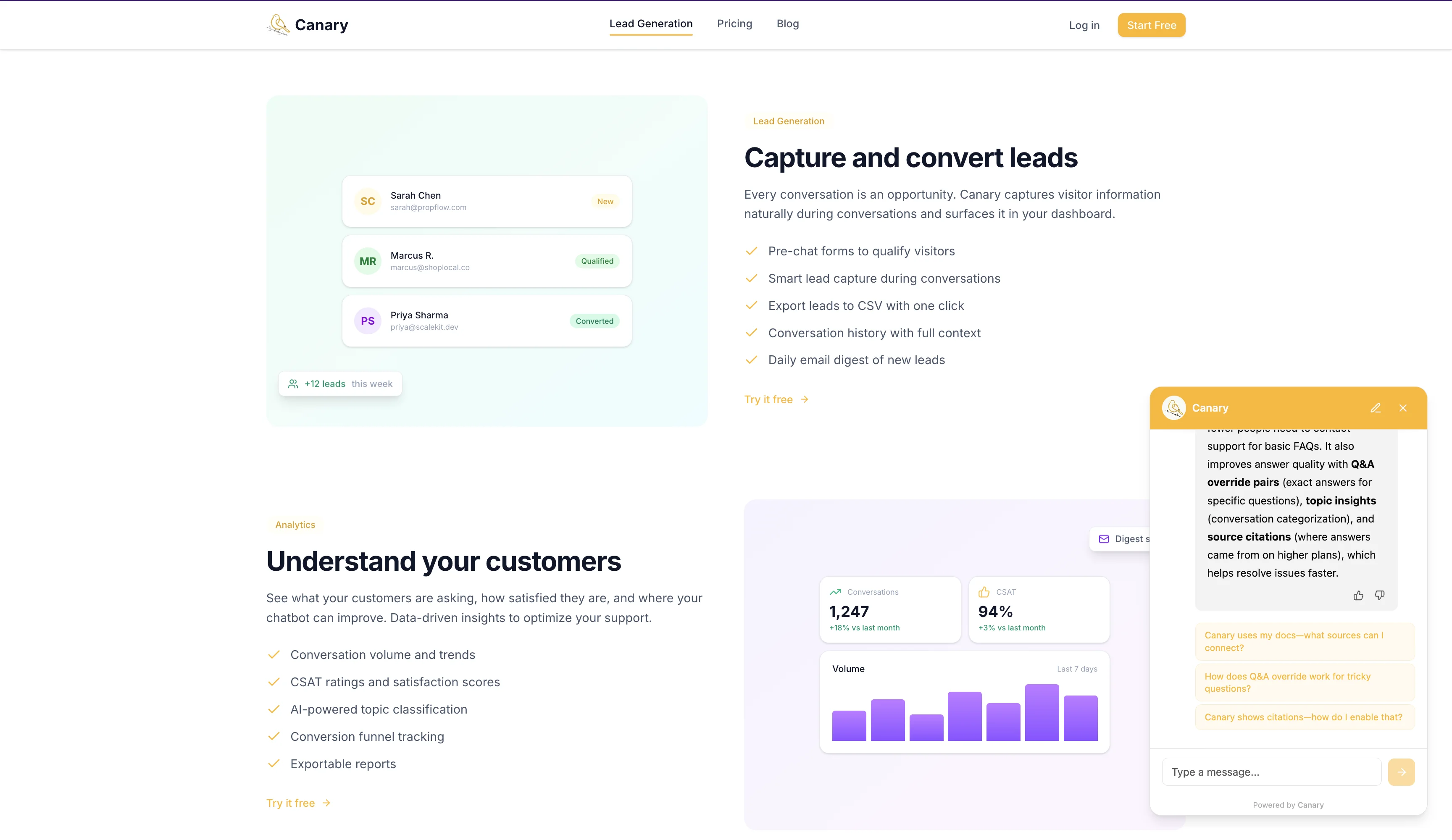
The chatbots that generate leads are trained on real knowledge — using a technique called retrieval-augmented generation (RAG) that grounds every answer in your actual documentation.
Your product documentation lets it answer specific feature questions accurately. Your FAQ pages help it handle objections before they become reasons to leave. Your pricing page means it won't dodge the budget conversation. And your case studies let it match a visitor's situation to a relevant customer story.
When a chatbot can say "Based on what you've told me, you're similar to how Acme Corp was using us, here's what they achieved," that's not a chatbot anymore. That's a knowledgeable sales assistant available 24/7.
The Qualification Framework We Used
We structured the bot around a lightweight version of the BANT framework (Budget, Authority, Need, Timeline) adapted for conversational flow:
Opening (30 seconds)
"Welcome to [Company]. Are you exploring [product category] for the first time, or evaluating specific vendors?"
This single question segments the conversation. "First time" gets educational content. "Evaluating vendors" gets objection handling and a meeting offer.
Qualifying Questions (woven naturally into conversation)
- Need: "What's the main problem you're trying to solve?" (open-ended, captures intent)
- Timeline: "Are you looking to have something in place in the next 30 days, or is this more of a longer-term evaluation?"
- Authority: "Is this something you're evaluating on your own, or are others on your team involved?"
- Budget: "Our plans start at [price]. Does that fit what you're working with, roughly?"
Lead Scoring and Routing
After the qualifying questions, the bot assigns a rough score and routes accordingly. A hot lead (3–4 signals: budget confirmed, decision-maker, timeline under 30 days) gets a calendar booking offer immediately. A warm lead (1–2 signals, evaluating but not ready) gets a resource like a case study or demo video, and you capture their email. An unqualified lead (0 signals, mismatched use case or no budget) gets routed to self-serve resources.
The key insight: these questions feel natural in a chat interface in a way they absolutely do not in a form. Nobody wants to fill in a "budget range" dropdown. But in a conversation, "does that fit your ballpark?" is just a normal thing to ask.
Here's a simplified conversation flow for a SaaS pricing page:
Visitor lands on pricing page (45 seconds)
  ↓
Bot: "Questions about our pricing? Happy to walk you through it."
  ↓
Visitor asks about a specific plan
  ↓
Bot answers directly → "What's your team size?"
  ↓
Bot: "Are you evaluating [Product] alongside other tools?"
  ↓
[If yes] Bot: "Most teams comparing us to [Competitor] switch because of X. Want to see a side-by-side?"
  ↓
Bot: "Would it help to talk to someone on our team? I can grab a 15-minute slot."
  ↓
Calendar link or email capture
Proactive Chatbots vs. Reactive Chatbots
We ran an A/B test that surprised us. Two versions of the chatbot:
- Version A (reactive): Widget sits in the corner until the visitor clicks it
- Version B (proactive): Widget sends a message after 45 seconds on the pricing page
The proactive version converted 2.3x more leads than the reactive version, even controlling for the same visitor traffic and page quality.
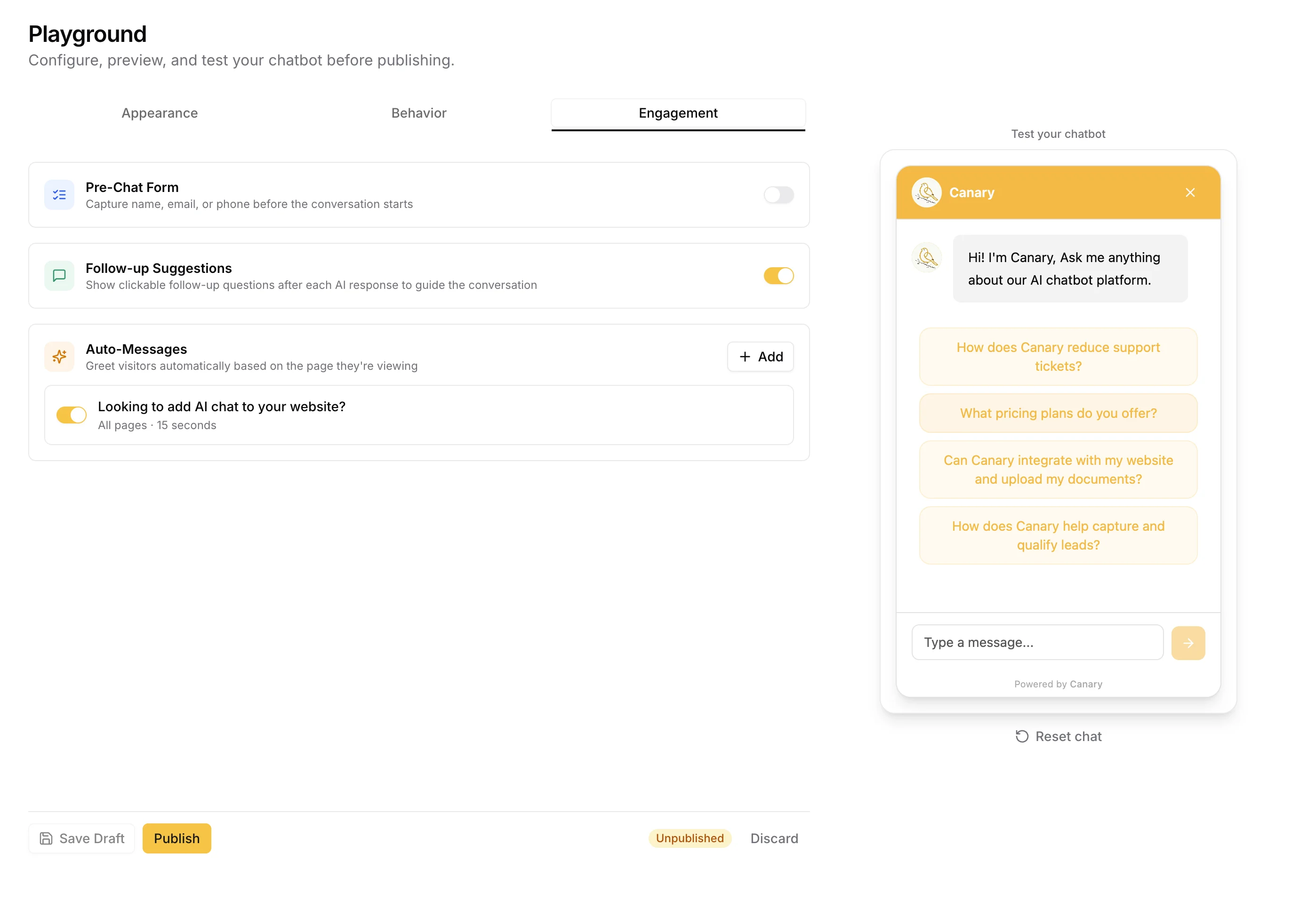
The trigger rules we used, from highest to lowest ROI:
- Pricing page, 45 seconds: "Questions about our pricing? Happy to walk you through it." (Highest intent signal)
- Competitor comparison page, 30 seconds: "Trying to figure out which tool fits best? I can help." (Evaluation mode)
- Homepage, 90 seconds, first visit: "New here? Here's what most people want to know first." (Discovery mode)
- Returning visitor, any page: Personalized opener referencing their prior visit
The rule of thumb: the later in the funnel the page, the sooner you should proactively engage. Someone on your pricing page at 45 seconds is not browsing. They are deciding.
Chatbot Lead Generation by Industry
The mechanics of chatbot lead generation adapt by vertical. The core stays the same: immediate engagement, conversational qualification, automatic routing. What changes is the conversation depth and what "qualified" means.
SaaS: Qualification-heavy. The chatbot focuses on company size, current tool stack, integration requirements, and timeline. Goal is calendar booking or trial signup. The BANT framework applies directly.
E-commerce: Volume-heavy. Short conversations. Chatbots capture email through discount offers, answer product questions, and recover abandoning visitors. Lead scoring is less relevant; email capture and cart recovery are the primary metrics.
Real estate: Property-matching conversations. The chatbot asks about budget range, preferred neighborhoods, buy vs. rent, and timeline to connect leads with the right agent. After-hours capture is especially valuable here. Most property inquiries happen evenings and weekends when agents aren't available.
Professional services (legal, accounting, consulting): Trust-building conversations. Chatbots answer process questions ("how does an initial consultation work?", "what are your typical fees?"), qualify by case type or service need, and route to intake forms or phone bookings.
B2B / Enterprise: Mid-funnel content delivery. Chatbots here handle case studies, ROI calculators, and demo requests rather than top-of-funnel cold capture. CRM integration becomes critical at this level.
CRM Integration: Connecting Chatbot Leads to Your Pipeline
A chatbot lead generation system that doesn't connect to your CRM is a data silo. Here's how the integration typically works:
HubSpot: Native integrations or Zapier. Chatbot conversations create contacts, log activity, and can trigger workflows. For example, an automated follow-up sequence for warm leads who engaged but didn't book.
Salesforce: Webhook-based integration or a middleware tool. Chatbot-qualified leads populate Lead or Contact objects, with the full conversation transcript logged as an activity.
Pipedrive: Direct API integration available on most platforms. Chatbot leads appear as Deals at the appropriate pipeline stage based on qualification score.
What to configure regardless of CRM:
First, map chatbot-collected fields (name, email, company, budget) to CRM fields on first contact. Tag chatbot-sourced leads distinctly so you can track close rate by source. Log the full conversation transcript, because your sales team needs context, not just a name and email. And trigger an immediate internal notification when a hot lead qualifies.
The goal is zero manual handoff. A lead qualifies at 2am, the CRM contact gets created, and the sales rep sees it in their queue by 9am with full conversation context already attached.
Chatbot vs. Live Chat: Which Generates More Leads?
Both, used correctly, generate leads. The distinction matters for staffing and cost.
Live chat requires a human agent available in real time. It converts at high rates during business hours but drops to zero after-hours unless you staff round the clock. That's expensive to scale, and inconsistent by definition.
An AI chatbot is available 24/7 at fixed cost, handles unlimited simultaneous conversations, and qualifies leads consistently. It can't match the nuance of an experienced salesperson for complex enterprise conversations, but that's not its job.
The winning combination: AI chatbot as first responder (qualifies intent, captures contact info, answers common questions), with automatic escalation to a live human when the conversation requires it. Our after-hours lead capture went from near zero to 41% of total leads using this hybrid model.
Choosing a Chatbot Platform: What to Actually Compare
The market is crowded and the pricing is surprisingly opaque. Here's the honest breakdown of what we evaluated:
| Platform | Starting Price | What's Hidden | Best For |
|---|---|---|---|
| Tidio | $24.17/mo (Starter, annual) | Lyro AI add-on priced per conversation; Flows add-on (+$29/mo for 2K visitors) — effective cost nearly doubles | Existing live chat customers adding AI |
| Chatbase | $40/mo | Credits-based pricing varies by model, unused credits don't roll over | Simple FAQ bots, no complex lead flows |
| SiteGPT | $39/mo | Branding removal (+$39/mo), extra messages (+$39/5K) | Single-site deployments |
| Intercom + Fin | $29/seat/mo | $0.99 per Fin outcome on top of seat fees, so 2,000 outcomes = $1,980 extra | Enterprise teams with large support volume |
| Canary | Flat rate from $127/mo for 10 tenants | Nothing. Flat-rate predictable pricing | Agencies, multi-site businesses, SaaS |
The consistent theme across Tidio, Chatbase, and Intercom: the advertised price is not the real price. Per-conversation billing, per-credit systems, and per-outcome fees mean your costs scale unpredictably with your success. The busier your chatbot lead generation system, the more you pay, often in amounts you didn't budget for.
If you're running multiple sites or evaluating this for more than one client, a multi-tenant flat-rate platform pays for itself quickly.
Try Canary free for 14 days — no credit card, no per-conversation surprises.
What We Got Wrong (And What to Avoid)
Not everything worked immediately. Here are the failures worth learning from:
Mistake 1: Launching Without Source Citations
Our first version of the chatbot would answer questions confidently, but visitors couldn't verify the answers. Skeptical buyers (especially B2B) want to see where information comes from. When we enabled source citations (showing which document the answer pulled from), trust scores went up and drop-off during conversations fell noticeably.
Mistake 2: Too Many Conversation Starters
We launched with 8 suggested questions on the homepage. Nobody clicked any of them. Reducing to 4 specific, high-intent options ("How does pricing work?", "What integrations do you support?", "Can I see a demo?", "How is data stored?") increased click-through by 40%.
Mistake 3: Not Optimizing for Mobile
Our widget was designed on desktop. On mobile, the initial prompt was partially hidden by the browser chrome. A lightweight widget that renders correctly on any device isn't optional. It's baseline.
Mistake 4: No Handoff Path for Complex Conversations
Some conversations need a human. Not having a clear "I'd like to speak to someone" path meant those prospects either left or submitted a form anyway. Adding a smooth human handoff, with a notification sent immediately to the sales team, recaptured this segment.
Metrics That Actually Matter
The chatbot industry loves to report on total conversations and message volume. Those are vanity metrics. What matters:
Lead generation metrics:
- Visitor-to-lead conversion rate: conversations that collect at least name + email
- Lead quality rate: leads that progress to a sales conversation
- After-hours lead capture: leads generated outside business hours (this number should be non-zero)
- Cost per qualified lead: chatbot monthly cost divided by qualified leads generated
Cost per lead benchmark: If your chatbot costs $127/mo and generates 40 qualified leads, your cost per lead is $3.18. Compare that to paid search CPLs of $40–$200+ in competitive B2B categories.
Quality metrics:
- CSAT score: post-conversation thumbs up/down
- Fallback rate: percentage of questions the bot couldn't answer (high fallback = training gap)
- Handoff rate: percentage that requested human escalation (benchmark: 10–20%)
Revenue metrics:
- Pipeline contribution: deals in the pipeline that started with a chatbot conversation
- Close rate by source: chatbot-sourced vs. form-sourced vs. organic
Track these monthly. The CSAT and fallback rate tell you where to improve the training. Pipeline contribution tells you whether any of this is working for the business.
FAQ: Chatbot Lead Generation
What is a lead generation chatbot? A lead generation chatbot is an AI-powered chat widget on your website that engages visitors in real-time conversation, captures contact information (name, email, company), and qualifies prospects without human involvement. Unlike a contact form, which is passive and creates a response delay, a chatbot is active: it initiates conversations, asks qualifying questions, and routes high-intent visitors to the right next step immediately.
How do chatbots generate leads? Three mechanisms. First, proactive engagement: triggering conversations when visitors show high-intent behavior, such as spending 45 seconds on a pricing page. Second, conversational lead capture: collecting contact details through natural dialogue rather than a form. Third, qualification: asking budget, timeline, and needs questions to filter high-potential prospects before routing them to sales.
How much does a lead generation chatbot cost? Entry-level AI chatbot platforms start at $24–40/month for a single site. Mid-tier platforms with lead qualification and CRM integrations typically run $100–300/month. Enterprise solutions (Intercom, Drift) scale into $500–2,000+/month once per-conversation or per-outcome fees are factored in. For agencies or businesses running multiple sites, flat-rate multi-tenant platforms ($127/mo for up to 10 sites) typically offer the best value.
Can chatbots replace contact forms? Yes, for most use cases. Chatbots consistently convert 3–4x higher than contact forms (10–20% vs. 2–5%), capture after-hours leads that forms leave to languish overnight, and deliver pre-qualified leads rather than raw form submissions. The one exception: highly regulated industries (healthcare, legal, financial) where specific form language is required for compliance. In those cases, a chatbot can supplement the form rather than replace it.
What questions should a chatbot ask to qualify leads? Use a conversational version of the BANT framework. Need: "What's the main problem you're trying to solve?" Timeline: "Are you looking to have something in place in the next 30 days?" Authority: "Is this something you're evaluating on your own, or are others involved?" Budget: "Our plans start at [price], does that fit your ballpark?" These four questions, woven naturally into conversation, capture enough signal to route leads appropriately without feeling like an interrogation.
What's the ROI on a lead generation chatbot? Most implementations see first-year ROI of 200–400%, driven by reduced time-to-qualification and increased lead volume from after-hours capture. The math: if a chatbot adds even 5 qualified leads per month at an average deal value of $2,000, that's $120,000 in annual pipeline from a tool that costs $1,500/year.
The Bottom Line
Swapping a contact form for a chatbot lead generation system is not a minor optimization. It's a structural change to how leads are captured and qualified. The form assumes the visitor is patient enough to wait. The chatbot assumes they're not. And it's right.
Our contact form converted at 2.8%. Our chatbot converts at over 9%. The difference isn't magic. It's immediacy, personalization, and the ability to have an intelligent conversation about a real business problem at 11pm on a Tuesday when no human is available. Every hour your contact form sits there doing nothing is an hour a competitor's chatbot is having that conversation instead.
Start with Canary, a multi-tenant AI chatbot platform trained on your own knowledge base, with flat-rate pricing starting at $127/month for up to 10 sites. No per-conversation fees. No credit systems. No surprises on your bill.