Best Free AI Chatbot for Website in 2026 (Honest Comparison)
I tested every free AI chatbot for websites. Most aren't free, and most aren't AI. Here's what you actually get for $0 in 2026.
I spent the last two weeks signing up for every free AI chatbot for website I could find. I tested 11 platforms. I trained each one on the same set of product docs, asked it 20 support questions, and tracked what happened when the free tier ran out.
The short version: most of the platforms advertising a free chatbot aren't actually offering a free AI chatbot. They're offering free live chat (no AI), free rule-based bots (no intelligence), or a 14-day trial they hope you forget to cancel.
I built Canary, so I have a dog in this fight. I'll be upfront about that, and I'll be upfront about Canary's limitations on the free tier. This comparison is honest because it has to be. If you have been burned by "free" before, this is the post that explains why.
The Problem With "Free" AI Chatbots in 2026
Search for "free AI chatbot for website" and you will find dozens of results. The problem is they're conflating three very different things:
- Free live chat with zero AI. A human agent answers every message. That is free customer support software, not a chatbot.
- Free rule-based bots. Decision trees and keyword triggers. They break the moment someone asks an unexpected question. This was the state of the art in 2019.
- Actually free AI chatbots. Trained on your content, powered by a language model, answering questions in natural language. This is what most people are searching for.
This post only covers category three. If you need live chat software, Tawk.to is genuinely free and unlimited. But it won't answer questions for you at 2am. For that, you need AI.
Every "Free" AI Chatbot, Compared Honestly
Here's what you actually get on the free tier of every platform I tested. No marketing language, just the limits.
| Platform | Free AI Messages | Trains on Your Content | Lead Capture | Branding Removable | The Catch |
|---|---|---|---|---|---|
| Botpress | 2,000/mo | Yes (URL + docs) | Yes | Yes | Developer-focused UI, steep learning curve |
| Canary | 50 conversations/mo | Yes (URL + docs + Q&A) | Yes | No (free tier) | Small conversation limit |
| Chatbase | 20 messages/mo | Yes (URL + docs) | Limited | No | 20 messages is basically a demo |
| Tidio | 0 AI messages | No (rule-based only on free) | Yes | No | AI (Lyro) requires $39/mo add-on |
| HubSpot | 0 AI messages | No (rule-based chatflows) | Yes | No | AI requires $90/seat Pro plan |
| Tawk.to | 0 AI messages | No | Yes | $19/mo to remove branding | No AI at all. Free live chat only |
| Crisp | 0 AI messages | No | Yes | No | AI (MagicReply) requires ~$95/mo plan |
| Kommunicate | Limited | Yes | Yes | No | Requires Google Cloud setup |
| Dialogflow | Unlimited (basic) | Build-your-own | No (build your own UI) | N/A | Developer-only. No widget included |
| ChatBot.com | 14-day trial | Yes | Yes | N/A | No free tier. Trial only |
| Boei | 7-day trial | Yes | Yes | N/A | No permanent free tier |
Three platforms offer a real, permanent free tier with actual AI: Botpress, Canary, and Chatbase. Everything else is either live chat without AI, rule-based bots, or a trial.
The Three Tiers of "Free" Chatbots
Understanding these tiers saves you from wasting hours setting up the wrong tool.
Tier 1: Free live chat, no AI
Tawk.to and Crisp (free plan) fall here. You get a widget on your site. When someone types a message, it goes to you or your team. If nobody is online, the visitor waits.
This is valuable if you have people available to respond. It's not a chatbot. There's no automation, no knowledge base, no after-hours coverage. The visitor at 11pm on a Saturday gets a "leave a message" form.
Tier 2: Free rule-based bots
Tidio (free plan) and HubSpot (free chatflows) live here. You build decision trees. "If visitor says X, reply with Y." They work for simple routing ("Are you looking for sales or support?") but break immediately on open-ended questions.
A visitor asking "does your widget work with Shopify and does it support multiple languages?" will get a confused fallback response. Rule-based bots don't understand language. They match keywords.
Tier 3: Free AI chatbots
Botpress, Canary, and Chatbase are the only platforms I found that offer a permanent free tier with actual AI that trains on your content. This is what most searchers want when they type "best free AI chatbot for website."
Each has tradeoffs. Here is where we get specific.
The 6 Best Free AI Chatbots for Your Website in 2026
1. Botpress. Best free tier for developers.
Botpress gives you 2,000 AI messages per month on the free tier. That's by far the most generous allocation in the market. It supports training on URLs, documents, and custom knowledge bases. The chatbot understands natural language and answers from your content.
The tradeoff is complexity. Botpress is built for developers. The interface uses concepts like "nodes," "intents," and "workflows." If you are comfortable building software, this is an incredible tool. If you are a small business owner who wants to paste a URL and get a working chatbot in 10 minutes, the learning curve is steep.
Free tier includes: 2,000 incoming messages/month, 5 bots, web chat, knowledge base training, API access.
Where it gets expensive: Pay-as-you-go pricing above the free tier. Costs scale with usage. Prices vary based on consumption.
Best for: Developers and technical founders who want maximum control and are comfortable with a builder interface.
Limitations: No-code setup is possible but rough. The widget design is functional, not polished. Documentation is extensive but assumes technical comfort.
2. Canary. Best for small business owners who want simplicity.
Full disclosure: I built this. I'll be honest about the limits.
Canary gives you 50 AI conversations per month on the free Starter plan. You train it by pasting your website URL (it crawls and indexes your pages automatically), uploading documents (PDF, CSV, XLSX), or adding Q&A pairs for your most common questions. The widget is 4KB, loads in milliseconds, and doesn't impact your Core Web Vitals.
50 conversations per month isn't a lot. For a small portfolio site or a local business getting a few hundred visitors a month, it covers your after-hours traffic. For anything above that, you need the Growth plan at $49/month for 1,000 conversations.
What you do get for free: knowledge-base-trained AI responses, source citations (the widget shows which document the answer came from), conversation starters, and basic analytics. Proactive messaging and Q&A pairs require the Growth plan.
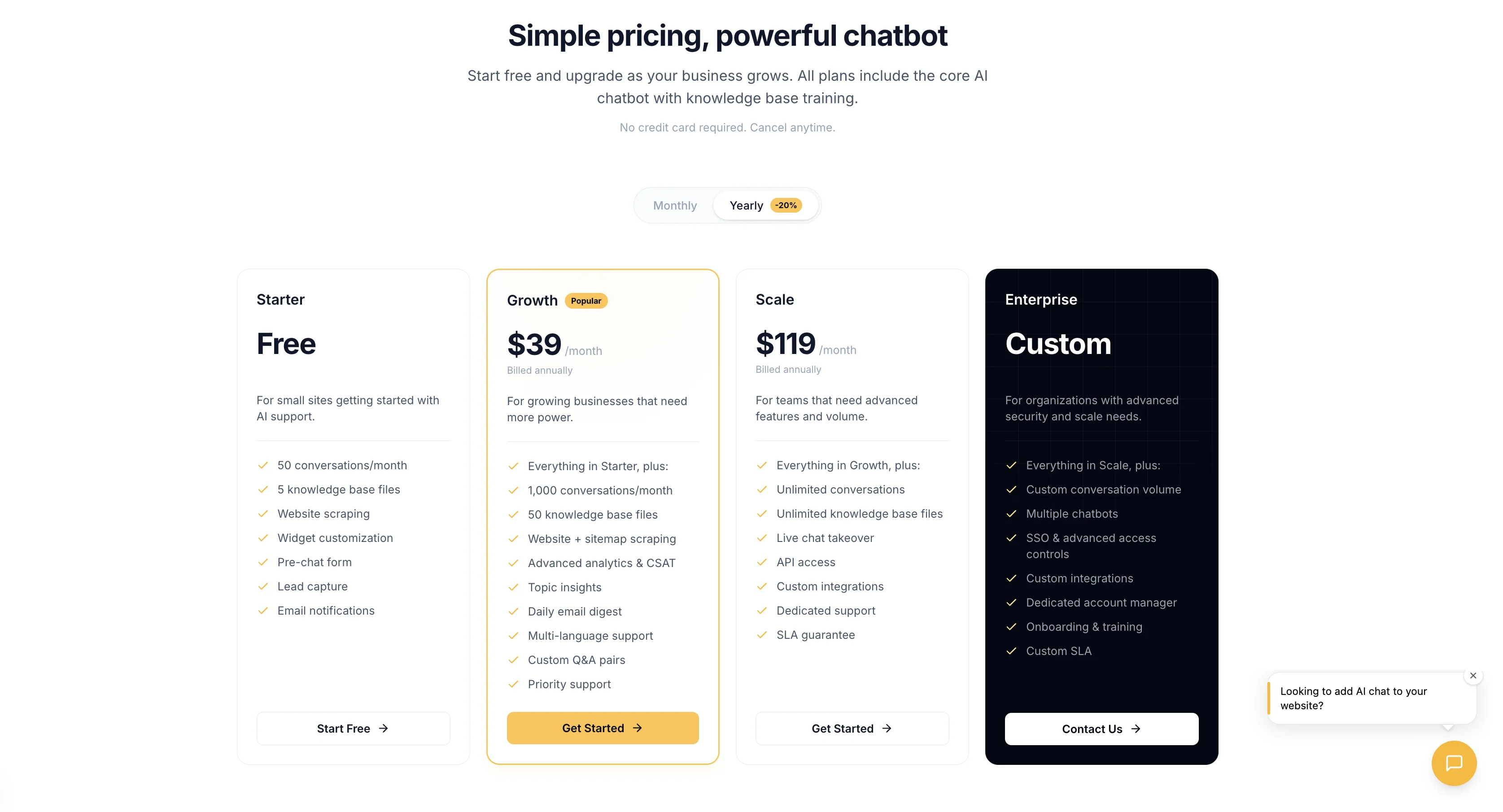
Free tier includes: 50 conversations/month, 1 knowledge source, 5 file uploads, AI responses with source citations.
Where it gets expensive: Growth plan at $49/month for 1,000 conversations. Scale at $149/month for unlimited. No per-conversation fees on any paid plan.
Best for: Small business owners who want a trained chatbot on their site without learning a builder tool. Agencies managing multiple sites (multi-tenant support on paid plans).
Limitations: 50 conversations/month is tight. Lead capture and proactive messaging are Growth-only. No live chat takeover yet (on the roadmap). Free tier includes Canary branding on the widget.
3. Chatbase. Fastest setup, smallest free tier.
Chatbase lets you paste a URL and have a chatbot in under 5 minutes. The setup experience is genuinely excellent. You get a trained chatbot faster than any other platform on this list.
The problem is the free tier: 20 AI messages per month. That's not 20 conversations. That's 20 individual messages. A single back-and-forth conversation with 4 messages uses 4 of your 20. You'll burn through the free tier in a day or two of real traffic.
Chatbase also uses a credit system on paid plans. GPT-4 responses consume 20 credits each, while GPT-3.5 responses consume 1 credit. If you aren't paying attention to which model is being used, your credits disappear fast.
Free tier includes: 20 messages/month, 1 chatbot, 400,000 character training limit.
Where it gets expensive: Hobby plan at $19/month (2,000 message credits). Standard at $99/month. Branding removal costs $39/month extra on top of your plan.
Best for: Quick testing and prototyping. If you want to see what an AI chatbot looks like on your site in 5 minutes, Chatbase is the fastest path.
Limitations: 20 messages isn't a usable free tier for production. Credit system is opaque. Branding removal is expensive ($39/month). No multi-site support on lower tiers.
4. Tidio. Best if you need live chat and are willing to pay for AI.
Tidio has the largest market presence for website chatbots. Over 300,000 Shopify stores use it. The free tier gives you 50 live chat conversations per month and unlimited basic chatbot flows (rule-based, not AI).
The AI component, called Lyro, is a separate add-on that costs $39/month. It's not included on any plan by default. So the "free" Tidio chatbot is a rule-based decision tree. Lyro is good when you pay for it, with solid natural language understanding and a polished interface. But calling Tidio a free AI chatbot is misleading.
Free tier includes: 50 live chat conversations/month, unlimited rule-based chatbot triggers, 1 operator seat.
Where it gets expensive: Communicator plan at $29/month for more live chat. Lyro AI add-on at $39/month (50 AI conversations). Growth plan with Lyro at $79/month.
Best for: Businesses that want live chat first and might add AI later. The combined live chat + AI experience is polished once you are on a paid plan.
Limitations: No AI on free tier at all. AI and live chat are separate charges that stack. Total cost for a working AI chatbot: $68-$79/month minimum.
5. HubSpot. Best if you already use HubSpot CRM.
HubSpot includes a free chatbot builder in its CRM suite. The free version lets you build rule-based chatflows that can route conversations, book meetings, and qualify leads through scripted questions.
There's no AI on the free plan. AI-powered chatbot features require the Professional plan, which starts at $90/seat/month for Marketing Hub or $800/month for Service Hub Professional. That's the single largest price jump from free to AI in this entire comparison.
If you are already paying for HubSpot Professional for other reasons, the chatbot is a useful addition. If you are signing up for HubSpot just to get a chatbot, the economics make no sense.
Free tier includes: Unlimited rule-based chatflows, meeting scheduler, basic lead qualification, full CRM integration.
Where it gets expensive: Marketing Hub Professional at $90/seat/month. Service Hub Professional at $800/month.
Best for: Teams already on HubSpot Professional who want to add chat without a third-party tool.
Limitations: AI requires a $90-$800/month plan. The chatbot builder is functional but rigid compared to purpose-built chatbot tools. No custom knowledge base training on free.
6. Tawk.to. Best truly free live chat (but no AI).
I am including Tawk.to because it dominates "free chatbot" search results, and readers deserve to know what it actually is. Tawk.to is a free, unlimited live chat platform. Unlimited agents, unlimited conversations, unlimited sites. It makes money by selling you hired chat agents ($1/hour) and charging $29/month for AI Assist and $19/month to remove branding.
There's no AI chatbot. No knowledge base training. No automated responses beyond canned snippets. When nobody is online, visitors get a "leave a message" form.
If you genuinely need free live chat and have humans available to respond, Tawk.to is the best in the market. If you need an AI that answers questions while you sleep, this isn't it.
Free tier includes: Unlimited live chat, unlimited agents, unlimited sites, canned responses.
Where it gets expensive: AI Assist at $29/month. Branding removal at $19/month. Hired agents at $1/hour.
Best for: Businesses with a dedicated support team that can respond to live messages. Agencies running chat for clients (unlimited sites).
Limitations: Zero AI capability on the free tier. No knowledge base. No automation beyond pre-written snippets. Not really a chatbot.
The Hidden Cost of "Free"
This is the section most comparison articles skip. Here's what "free" actually costs when you need the features that matter.
| Platform | Advertised as | Actual cost for AI + no branding | What you are really paying |
|---|---|---|---|
| Tawk.to | Free | $29/mo (AI) + $19/mo (remove branding) = $48/mo | More than most paid chatbot tools |
| Tidio | Free | $39/mo (Lyro AI) + $29/mo (Communicator) = $68/mo | Nearly 2x a dedicated AI chatbot |
| HubSpot | Free | $90/seat/mo minimum = $90+/mo | Enterprise pricing for a chatbot |
| Crisp | Free | ~$95/mo (Business plan for MagicReply AI) = $95/mo | Most expensive "free" chatbot |
| Chatbase | Free (20 msgs) | $19/mo + $39/mo (remove branding) = $58/mo | Branding removal costs more than the plan |
| Canary | Free (50 convos) | $49/mo (Growth, includes branding removal) = $49/mo | Flat rate, no add-on stacking |
| Botpress | Free (2,000 msgs) | Pay-as-you-go above free tier | Varies based on consumption |
The pattern is clear. Platforms that advertise a free tier often end up costing more than platforms that charge upfront, because the free tier is designed to get you invested before revealing the real price.
For a deeper breakdown of chatbot pricing across the market, see our full 2026 AI chatbot cost guide.
What to Look For in a Free AI Chatbot
If you are evaluating free tiers, these five things matter more than the feature list on the landing page.
Does it train on your content? A chatbot that can't learn your pricing, your return policy, and your product details is just a generic GPT wrapper. You need retrieval-augmented generation (RAG), which means the AI reads your actual documents before answering. If you want to understand how this works under the hood, we wrote a practical guide to training a chatbot on your website.
What happens at the limit? Some platforms cut you off with a hard wall. Others degrade to a "leave a message" form. Others charge overages. Know what happens when you hit the ceiling before you build your workflow around it.
Can you remove branding? "Powered by [Platform]" on your widget looks unprofessional on a business site. Many platforms charge $19-$59/month just to remove it. Factor that into the real cost.
Does it capture leads? Some free tiers strip out lead capture forms. If the entire point of your chatbot is to collect visitor emails, check whether the free plan supports it.
How fast does it load? A chatbot that adds 200KB of JavaScript to your site will hurt your Core Web Vitals and your search rankings. The widget should be under 50KB. Canary's is 4KB. Chatbase and Botpress are larger but reasonable.
Calculate Your Actual ROI
Before you commit to any platform, run the numbers. Even a free chatbot has an opportunity cost (your time setting it up and maintaining it). A paid chatbot needs to justify its subscription.
Try it yourself
Your current support metrics
Canary is free on Starter, or $49/mo on Growth
Your projected savings
Monthly savings
$551
Annual savings
$6,612
ROI
1124%
Payback period
3 days
Tickets automated/mo
225
Hours saved/mo
30h
Based on industry averages. Actual results may vary depending on your chatbot configuration, knowledge base quality, and customer query complexity.
Most businesses handling more than 100 support tickets per month see positive ROI from a chatbot within the first month, even on a paid plan. For a detailed breakdown, see our website chatbot ROI analysis.
Which Free Chatbot Should You Actually Use?
| Your situation | Best pick | Why |
|---|---|---|
| Developer building a custom chatbot experience | Botpress | 2,000 free messages, full API access, maximum flexibility |
| Small business owner, want it working in 10 minutes | Canary | Paste your URL, customize colors, embed one script tag. 50 free conversations |
| Just want to test what an AI chatbot looks like | Chatbase | Fastest setup. 20 messages is enough for a demo, not production |
| Need live chat today, might add AI later | Tidio | Best live chat experience. AI is a paid add-on when you are ready |
| Already on HubSpot Professional | HubSpot | AI chatflows are included in the plan you are already paying for |
| Need unlimited free live chat, have humans to respond | Tawk.to | Genuinely free. Unlimited everything. Just not AI |
For small businesses specifically, we have a more detailed guide covering setup, ROI, and platform-specific installation.
Frequently Asked Questions
Is there a truly free AI chatbot with no limits?
No. Every AI chatbot has infrastructure costs (the language model charges per token). Botpress offers 2,000 messages/month for free, which is the most generous tier available. Above that, you pay. Anyone claiming unlimited free AI is either rate-limiting you quietly or planning to change the terms.
What is the best free chatbot for Shopify?
For Shopify specifically, you have two options. Install a Shopify app (Tidio is the most popular at 300,000+ installs, but AI costs extra). Or paste a script tag into your theme.liquid file from any widget-based chatbot (Canary, Chatbase, Botpress). The script approach avoids app fees and doesn't slow down your store. For platform-specific instructions, see our embed guide.
What is the best free chatbot for WordPress?
Similar situation. You can install a WordPress plugin (Tidio has the largest installation base) or paste a script tag via a header/footer plugin like WPCode. See our full WordPress chatbot comparison for a side-by-side review of 9 platforms.
Free chatbot vs paid. When should I upgrade?
Upgrade when one of these happens: you are hitting the conversation limit regularly, you need lead capture or proactive messaging, visitors are seeing "leave a message" instead of AI responses because you are out of credits, or the chatbot branding is hurting your professional image.
Do free chatbots hurt my website speed?
It depends on the widget. A well-built chatbot loads asynchronously and shouldn't affect your page load time. Check the bundle size. Canary loads 4KB. Tawk.to loads significantly more. If your Lighthouse performance score drops after adding a chatbot, the widget is too heavy.
Can a free chatbot actually handle real customer support?
Yes, if it is trained properly. The AI quality depends on your knowledge base, not the price tier. A free Canary chatbot trained on a comprehensive FAQ will outperform a $200/month enterprise tool trained on a thin knowledge base. The model is the same. The data you give it makes the difference.
What is the difference between a chatbot and live chat?
Live chat connects a visitor to a human agent in real time. A chatbot uses AI to answer automatically. Most modern platforms blend both: the AI handles routine questions, and a human takes over for complex issues. On free tiers, you usually get one or the other, not both.
Are free chatbots secure?
Reputable platforms (Botpress, Canary, Tidio, HubSpot) use HTTPS, encrypt data in transit, and store conversations securely. The risk isn't the free tier itself. It's using an unknown, unvetted platform that appeared last month. Stick with established tools that have clear privacy policies and data handling documentation.
The Bottom Line
The best free AI chatbot for your website in 2026 depends on who you are. If you are a developer, Botpress gives you the most room to build. If you are a small business owner who wants a working chatbot in 10 minutes without touching code, Canary's free tier covers your low-traffic pages. If you just need to see what AI chat looks like before committing, Chatbase gets you there fastest.
The platforms advertising "free" the loudest (Tidio, HubSpot, Crisp, Tawk.to) are free live chat or free rule-based bots. They're useful tools. But they're not free AI chatbots, and calling them that wastes your time.
Pick the tool that fits your volume, your technical comfort, and your budget. Start with the free tier. Upgrade when the numbers justify it.
Want to try it? Canary gives you 50 free AI conversations per month, trained on your website content. No credit card, no trial expiration. Paste your URL, customize the widget, and embed one script tag.